
If you've spent any time configuring user authentication on... Full Story
By Manny Fernandez
April 2, 2018

Making PopClip work in UltraEdit and SecureCRT
I use PopClip for Mac and it is such an awesome tool. What PopClip does: When you highlight some text, you will see a pop up message that allows you to ‘copy’ the text, then when you click anywhere else, you will see another popup that defaults to ‘paste’. In addition to PopClip, I use UltraEdit as my text editor of choice. It is very powerful and of course SecureCRT. IMHO, SecureCRT is the absolute best SSH/Console app ever. Both UltraEdit and SecurCRT run on Windows, Linux and macOS.
I use these two apps religiously and all day. The issue was that PopClip did not work in either of them. I searched and searched and there was nothing saying how to make it work. I was willing to pay PopClip to make it work. In a last ditch effort, I sent another email to PopClip support and got the right person to respond. Here is his response:
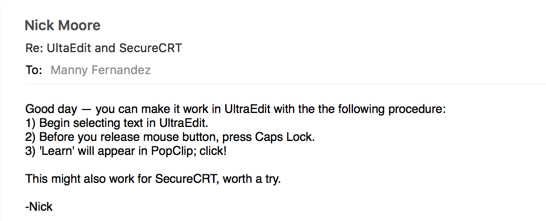
This guy was on the money. It worked like a champ. Just as the email says,
Select the text from one of the applications, while holding the mouse button press ‘caps lock’ key. You will see a popup that says ‘Learn’. Select the ‘Learn’ button and that’s it.
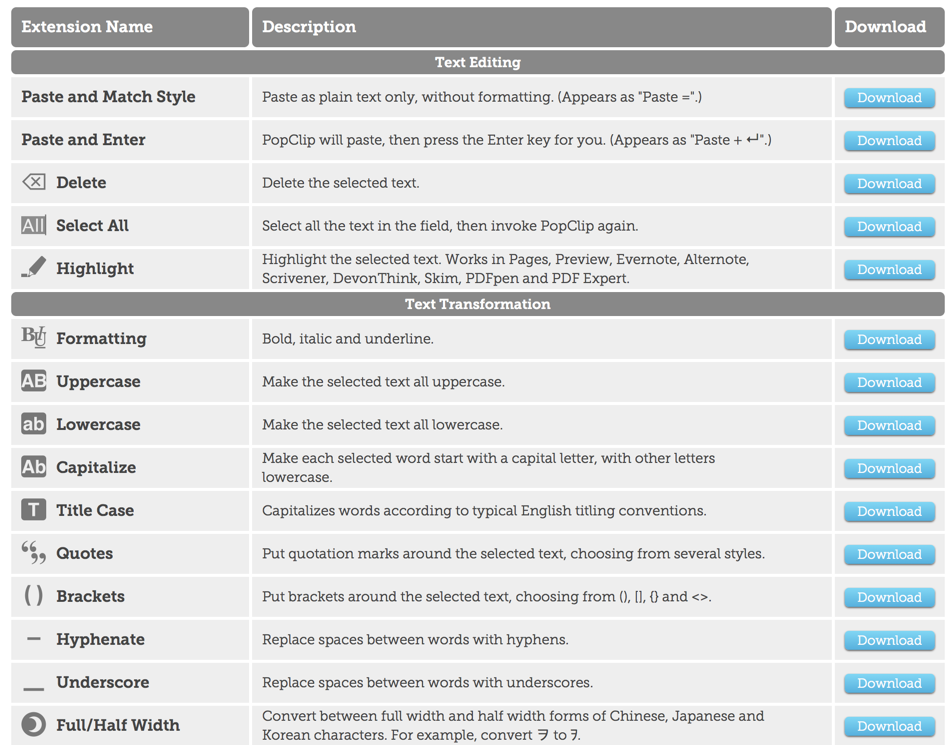
PopClip is much more that just copy/paste. You can leverage ‘extensions’ to do other functions. I have extensions for OmniFocus, Evernote, Chrome etc. I use Safari for regular browsing. A use case for me is I can highlight a URL and click ‘Chrome’ and it will launch Chrome, insert the URL and hit enter.

The above figure shows my extension for Evernote, Chrome, Change case to Title case (T), iMessage, BusyCal, OmniFocus, Slack, and finally email.
Here is an example of the extensions:
If you are running on an Apple computer, check out PopClip.
Recent posts
-

-

DNS is one of those technologies that quietly underpins... Full Story
-

BGP issues on FortiGate firewalls usually trace back to... Full Story
-

Every time your laptop talks to your router, a... Full Story
-

If you've spent any time configuring NAT on a... Full Story
-

If you have spent any time configuring firewall policies... Full Story
-

High availability on FortiGate is one of those features... Full Story
-

If you've configured SD-WAN on a FortiGate, you've almost... Full Story
-

FortiLink is the management protocol that turns a FortiSwitch... Full Story
-

FortiSwitches are pretty rock solid from Mean Time Between... Full Story
-

This is a quicky tip. Have you ever gone... Full Story
-

DNS is one of those quiet pieces of internet... Full Story
-

This article is an updated version of the previous... Full Story
-

You will add ns2 as a secondary (slave) BIND9... Full Story
-

In the process of deploying my lab, I needed... Full Story
-

RFC 8805, used to be known as Self-Correcting IP... Full Story
-

Years back, I wrote an article about certificate pinning. ... Full Story
-

FortiGates have the ability to send alerts to Microsoft... Full Story
-

In this post, I am going to walk through... Full Story
-

Troubleshooting VoIP on a FortiGate can feel like trying... Full Story
-

Prior to FortiOS 7.0, there were three commands to... Full Story
-

In this post, I am going to go over... Full Story
-

What we are going to do: We are going... Full Story
-

Choosing between FGCP (FortiGate Clustering Protocol) and FGSP (FortiGate... Full Story
-

Creating a VLAN on macOS (The "Pro" Move) A... Full Story
-

This blog post explores the logic behind how macOS... Full Story
-

Pretty Fly for a Wi-Fi Tell My Wi-Fi Love... Full Story
-

Part of my daily gig is creating BoMs (Bill-of-Materials)... Full Story
-

ICMP introduces several security risks, but careful filtering, rate... Full Story
-

The command diag debug application dhcps -1 enables full... Full Story
-

In the world of FortiOS, execute tac report is... Full Story
-

LLDP; What is it The Link Layer Discovery Protocol... Full Story
-

What it actually does When you run diagnose fdsm... Full Story
-

Monkey Bites are bite-sized, high-impact security insights designed for... Full Story
-

I have run macOS in macOS with Parallels but... Full Story
-

Don't be confused with my other FortiNAC posts where... Full Story
-

This is the third session in a multi-part article... Full Story
-

Today I was configuring key-based authentication on a FortiGate... Full Story
-

Netcat, often called the "Swiss Army knife" of networking,... Full Story
-

At its core, IEEE 802.1X is a network layer... Full Story
-

In case you did not see the previous FortiNAC... Full Story
-

This is our 5th session where we are going... Full Story
-

Now that we have Wireshark installed and somewhat configured,... Full Story
-

The Philosophy of Packet Analysis Troubleshooting isn't about looking... Full Story
-

Quick-Tip The default macOS zsh prompt prints your username,... Full Story
-

Executive summary. After Apple significantly upgraded Reminders, I finally... Full Story
-

The 20-byte tunnel nobody talks about: config system ipip-tunnel... Full Story