
If you've spent any time configuring user authentication on... Full Story
By Manny Fernandez
September 25, 2026

FortiGate Cloud SD-WAN Overlay: Hub-and-Spoke Orchestration Without a FortiManager
Build an ADVPN overlay across your branches from the FortiGate Cloud portal, with Fortinet-hosted hubs and transactional config push.
Executive Summary
Objective: Stand up an ADVPN-based SD-WAN overlay across multiple FortiGate branches using nothing but the FortiGate Cloud portal.
Target audience: Network engineers and MSPs running small to mid-sized FortiGate estates who want SD-WAN overlays without deploying FortiManager.
For years, building a proper Fortinet SD-WAN overlay meant FortiManager templates, BGP on loopbacks, and a lot of hand-tuned IPsec. FortiGate Cloud now handles the heavy lifting for smaller deployments. The SD-WAN Overlay feature provisions overlay networks to your FortiGates from the portal through a GUI wizard, scoped to a single region.
Under the hood it is ADVPN. The hub brokers the overlay and tells spokes when a better path exists between two of them. The spokes then build shortcut tunnels directly to each other, so branch-to-branch traffic stops hairpinning through the hub.
The detail that separates this from the FortiOS Fabric Overlay Orchestrator: the hubs are Fortinet-hosted. During setup you pick a Primary and a Secondary hub location from dropdowns. You are not racking a hub FortiGate. You are choosing a region.
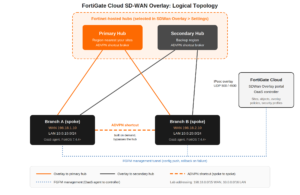
Prerequisites and Architecture
Assumed Knowledge
IPsec fundamentals, ADVPN concepts (hub, spoke, shortcut), and basic FortiGate SD-WAN (members, zones, performance SLAs).
Requirements
- FortiOS 7.4.4 or later on every FortiGate acting as a spoke.
- FortiOS 7.6.1 and 7.6.2 are not supported. Skip them.
- FortiOS 7.6.0 or later if you want security profiles pushed from the portal.
- An SD-WAN Overlay bundle subscription on every spoke.
- Every spoke provisioned in FortiGate Cloud under the same account it is registered to in FortiCare.
- Spoke ISPs must pass UDP 500 and UDP 4500 (IKE and NAT-T).
- A FortiGate Cloud region of Global, U.S., or Europe. Japan availability has not been announced yet.
Licensing heads-up
The required FortiGate Cloud tier has moved between portal releases. The 25.x admin guides list the feature under an Advanced license, while the 26.2 guide lists a Standard subscription. Check the current Subscription types page before you quote it to a customer.
Component Table
| Component | Role | Lab example |
|---|---|---|
| FortiGate Cloud portal | Orchestrator: sites, objects, overlay policies, security profiles | SDWan Overlay menu |
| Fortinet-hosted hubs | ADVPN hub and shortcut broker | Primary + Secondary region |
| Branch FortiGate A | Spoke | WAN 198.18.1.10, LAN 10.0.10.0/24 |
| Branch FortiGate B | Spoke | WAN 198.18.2.10, LAN 10.0.20.0/24 |
| OaaS agent (on each FortiGate) | Validates and applies orchestrated config as a transaction | Built into FortiOS |
The OaaS agent is what makes this safe to run against production. It talks to the OaaS controller in FortiCloud over the FGFM management tunnel, diffs the incoming configuration against what is running, and applies it as a single transaction. If any part of the change fails, the agent rolls back everything that was orchestrated in that push. No half-configured spokes.
Step-by-Step Implementation Workflow
Step 1: Confirm Access and Permissions
Goal: Make sure your admin account can actually see and edit the feature.
Action: An IAM user needs full read-write in its role-based access profile to administer SD-WAN Overlay. Since May 3, 2025, the FortiCloud IAM portal also exposes a dedicated SD-WAN Overlay role control inside the FortiGate Cloud permission profile. Grant read-write to the engineers building the overlay and read-only to NOC staff.
GUI verification: The SDWan Overlay menu appears in the FortiGate Cloud left navigation.
Step 2: Verify Spoke Firmware
Goal: Catch unsupported builds before the portal does.
Action: Check the running version on every spoke.
get system status | grep VersionExpected: v7.4.4 or later, not v7.6.1 or v7.6.2. Use FortiGate Cloud Firmware management to upgrade in bulk if needed.
Step 3: Select Hub Locations
Goal: Anchor the overlay to Fortinet-hosted hubs.
Action: Go to SDWan Overlay > Settings. Choose a Primary Hub Location and a Secondary Hub Location geographically closest to your branches. Proximity drives both latency and failover quality.
GUI verification: Both locations are saved on the Settings page and render in the Topology view.
Step 4: Create Sites
Goal: Register each spoke FortiGate with the overlay.
Action: Create a site for each branch, then edit it to define its ISP links and LAN subnets. You do not have to onboard every site on day one. Sites, ISPs, and subnets can be added after the initial push.
Portal values for Branch A
Site name:    branch-a
ISP 1:        wan1  198.18.1.10/24  gateway 198.18.1.1
LAN subnet:   10.0.10.0/24
Portal values for Branch B
Site name:    branch-b
ISP 1:        wan1  198.18.2.10/24  gateway 198.18.2.1
LAN subnet:   10.0.20.0/24
GUI verification: Each site shows in the site list with ISPs and subnets populated.
Step 5: Build Shared Objects
Goal: Define the building blocks your overlay policies will reference.
Action: The SDWan Overlay menu carries its own object store: Addresses, IPAM, Services, Schedules, IP Pools, and Security Profiles (AntiVirus, Web Filter, Application Control, IPS). Create an address object per site LAN.
Address objects
branch-a-lan    10.0.10.0/24
branch-b-lan    10.0.20.0/24
Let IPAM hand out LAN subnets if you are building greenfield sites. It keeps addressing collision-free as the overlay grows.
Step 6: Author Overlay Policies
Goal: Control east-west traffic between sites from one place.
Action: Go to SDWan Overlay > Overlay Policy. Overlay policies are policies whose source and destination can live at different sites, crossing the overlay. Create branch-a-lan to branch-b-lan (and the reverse) with the services you actually need, not ALL. Attach security profiles if the sites run 7.6.0 or later.
GUI verification: The policy lists under Viewing policies with the expected source site, destination site, and services.
Step 7: Provision
Goal: Push the configuration to the spokes.
Action: Apply the configuration from the portal and watch the task list for per-site status.
GUI verification: Every task reports success. A failed task triggers the OaaS agent rollback, so the affected spoke keeps its previous working config.
Verification and Validation
Run these on each spoke after provisioning.
Orchestration Sync State
get oaas statusExpected success output
Account ID: <account-id>
Account: admin@example.com
Site: branch-a
Configuration version: 4
Configuration sync status: SUCCESS
Target version: 4
Configuration version must equal Target version, and sync status must read SUCCESS.
Hub Tunnels
get vpn ipsec tunnel summary
diagnose vpn ike gateway list
Expected: Tunnels to both the primary and secondary hubs show as up with incrementing counters.
SD-WAN Members and SLA Health
diagnose sys sdwan member
diagnose sys sdwan health-check
Expected: Overlay members present and alive, health checks reporting latency, jitter, and packet loss within SLA.
ADVPN Shortcut Test
From a host in 10.0.10.0/24, ping a host in 10.0.20.0/24 for a few seconds, then rerun get vpn ipsec tunnel summary on Branch A. A dynamically created shortcut tunnel toward Branch B should appear alongside the hub tunnels. A traceroute across the overlay should no longer show the hub as a hop.
Troubleshooting and Gotchas
Gotcha 1: Tunnels Never Establish
Symptom: Sites provision cleanly but hub tunnels stay down.
Cause: Something upstream is eating UDP 500 or 4500. Carrier-grade NAT, ISP CPE firewalls, and cellular APNs are the usual suspects.
Diagnose
diagnose debug reset
diagnose vpn ike log filter rem-addr4 <hub-public-ip>
diagnose debug application ike -1
diagnose debug console timestamp enable
diagnose debug enable

# reproduce, then stop:
diagnose debug disable
diagnose debug reset
Resolution: If you see IKE retransmits with no response, the packets are not reaching the hub. Open UDP 500/4500 outbound on any device in front of the FortiGate, or put the ISP modem in bridge mode.
Gotcha 2: Site Onboarding Fails or the Device Is Missing
Symptom: The FortiGate does not appear in the site picker, or provisioning errors out immediately.
Cause: Unsupported firmware (below 7.4.4, or 7.6.1/7.6.2), a missing SD-WAN Overlay bundle subscription, or an account mismatch between FortiGate Cloud and FortiCare. Devices transferred between accounts trip this constantly.
Resolution: Confirm the version with get system status, check the subscription on the asset in FortiCare, and make sure the device’s FortiGate Cloud account matches its FortiCare registration account.
Gotcha 3: Security Profiles or Config Changes Do Not Stick
Symptom: Overlay policies land but security profiles do not, or a push reports failure and the spoke looks unchanged.
Cause: Security profiles require 7.6.0 or later on the site. An unchanged spoke after a failed task is the OaaS rollback doing its job.
Resolution: Upgrade the site, then check get oaas status for the error field and the configuration version gap before retrying the push.
When to Use This vs. FortiManager
FortiGate Cloud SD-WAN Overlay fits single-region branch estates that want ADVPN without owning hub hardware or a FortiManager: retail, clinics, franchise locations, small multi-site offices. Once you need multi-region designs, custom BGP policy, your own data center FortiGate as the hub, or template-level control of every IPsec and routing knob, FortiManager’s SD-WAN Overlay Orchestration or a hand-built design is still the right tool.
Reference: Fortinet Document Library, FortiGate Cloud 26.2 Administration Guide, SD-WAN Overlay chapter; FortiOS 7.6 Administration Guide, SD-WAN Overlay-as-a-Service.
Recent posts
-

-

DNS is one of those technologies that quietly underpins... Full Story
-

BGP issues on FortiGate firewalls usually trace back to... Full Story
-

Every time your laptop talks to your router, a... Full Story
-

If you've spent any time configuring NAT on a... Full Story
-

If you have spent any time configuring firewall policies... Full Story
-

High availability on FortiGate is one of those features... Full Story
-

If you've configured SD-WAN on a FortiGate, you've almost... Full Story
-

FortiLink is the management protocol that turns a FortiSwitch... Full Story
-

FortiSwitches are pretty rock solid from Mean Time Between... Full Story
-

This is a quicky tip. Have you ever gone... Full Story
-

DNS is one of those quiet pieces of internet... Full Story
-

This article is an updated version of the previous... Full Story
-

You will add ns2 as a secondary (slave) BIND9... Full Story
-

In the process of deploying my lab, I needed... Full Story
-

RFC 8805, used to be known as Self-Correcting IP... Full Story
-

Years back, I wrote an article about certificate pinning. ... Full Story
-

FortiGates have the ability to send alerts to Microsoft... Full Story
-

In this post, I am going to walk through... Full Story
-

Troubleshooting VoIP on a FortiGate can feel like trying... Full Story
-

Prior to FortiOS 7.0, there were three commands to... Full Story
-

In this post, I am going to go over... Full Story
-

What we are going to do: We are going... Full Story
-

Choosing between FGCP (FortiGate Clustering Protocol) and FGSP (FortiGate... Full Story
-

Creating a VLAN on macOS (The "Pro" Move) A... Full Story
-

This blog post explores the logic behind how macOS... Full Story
-

Pretty Fly for a Wi-Fi Tell My Wi-Fi Love... Full Story
-

Part of my daily gig is creating BoMs (Bill-of-Materials)... Full Story
-

ICMP introduces several security risks, but careful filtering, rate... Full Story
-

The command diag debug application dhcps -1 enables full... Full Story
-

In the world of FortiOS, execute tac report is... Full Story
-

LLDP; What is it The Link Layer Discovery Protocol... Full Story
-

What it actually does When you run diagnose fdsm... Full Story
-

Monkey Bites are bite-sized, high-impact security insights designed for... Full Story
-

I have run macOS in macOS with Parallels but... Full Story
-

Don't be confused with my other FortiNAC posts where... Full Story
-

This is the third session in a multi-part article... Full Story
-

Today I was configuring key-based authentication on a FortiGate... Full Story
-

Netcat, often called the "Swiss Army knife" of networking,... Full Story
-

At its core, IEEE 802.1X is a network layer... Full Story
-

In case you did not see the previous FortiNAC... Full Story
-

This is our 5th session where we are going... Full Story
-

Now that we have Wireshark installed and somewhat configured,... Full Story
-

The Philosophy of Packet Analysis Troubleshooting isn't about looking... Full Story
-

Nmap Scripting Engine (NSE): From One-Liners to Your First... Full Story
-

Stand up TRex on Ubuntu, wire it through a... Full Story
-

1. Executive Summary Objective: Get a working, persistent nftables... Full Story