
If you've spent any time configuring user authentication on... Full Story
By Manny Fernandez
June 4, 2026
FortiGate Replacement Messages: A Practical Deployment Guide
Replacement messages are the pages and text blocks that FortiOS substitutes in place of blocked, quarantined, or intercepted content. When a user hits a web filter block, an antivirus catch, an authentication prompt, an SSL-VPN portal error, or an admin lockout page, what they see is a replacement message. This guide covers what they are, how to modify them through both the GUI and CLI, how to scope them with message groups, and the limitations and gotchas that bite people in production.
Target audience: network and security engineers running FortiOS 7.x or 8.x.
1. What replacement messages actually are
FortiOS stores replacement messages as HTML and plain-text files inside the configuration. They are grouped into categories such as http, webproxy, ftp, mail, spam, nntp, fortiguard-wf, alertmail, admin, sslvpn, nac-quar, traffic-quota, utm, icap, auth, and custom-message. Each category contains one or more message types, and each type holds a buffer (the HTML or text body) plus a header mode and a format.
Two facts shape everything else:
– A replacement message is only ever shown when FortiGate itself terminates or intercepts the session and needs to return content to the client. If traffic is silently dropped at the policy level, there is no message to replace.
– The HTTP and web-proxy categories are HTML pages. If the unit performs SSL inspection, these same pages are returned for HTTPS sessions as well.
2. The two GUI views
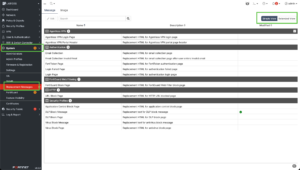
Navigate to System > Replacement Messages. The page defaults to Simple View, which surfaces the handful of messages most people edit. The full catalog (every category and type) only appears in Extended View, toggled from a link in the upper-right corner of the top menu.
If you go looking for a message and cannot find it, you are almost certainly in Simple View. Switch to Extended View first. This is the single most common point of confusion for newcomers.
3. Editing a message in the GUI (step by step)
1. Go to System > Replacement Messages.
2. Click Extended View if the message you want is not listed.
3. Select the message and click Edit.
4. The editor is split: rendered preview on the left, HTML source on the right. The preview updates in real time as you type.
5. To insert a dynamic variable, either right-click and choose Insert Tag, or type %% to bring up the tag list, or start typing a tag name and press Enter or Tab to auto-complete.
6. Click Save.
That is the entire GUI workflow. The live preview makes iterating on layout fast, but remember the preview renders with placeholder values, not live session data.
4. Editing from the CLI
The GUI is convenient for one-off edits; the CLI is what you script and what you put in config backups. The structure is:
config system replacemsg <category> <message-type>
set buffer "<html or text body>"
set header {none | http | 8bit}
set format {none | text | html | wml}
next
end
For example, to customize the per-IP shaper traffic quota block page:
config system replacemsg traffic-quota "per-ip-shaper-block"
set buffer "<html><head><title>Traffic Quota Control</title></head>
<body><font size=2>
Traffic blocked because it exceeded the per IP shaper session quota.
Please contact the system administrator.<br>
%%QUOTA_INFO%%<br><hr>
</font></body></html>"
next
end
To find the exact category and message-type strings, tab-complete through `config system replacemsg ?` in the CLI. Each category has its own subcommand and its own valid message types.
5. Dynamic tags
Tags are the variables FortiOS expands at render time. They are wrapped in double percent signs, for example %%QUOTA_INFO%%, %%QUARWORD%%, and %%LINK%%. The set of valid tags differs per message type, which is why the GUI offers an Insert Tag picker scoped to the message you are editing rather than a single global list.
A few you will encounter often:
– %%QUOTA_INFO%% shows quota detail on traffic-quota pages.
– %%LINK%% and related link tags appear on filter block pages.
– %%IMAGE:<image_name>%% embeds a stored image (see below).
Rather than memorizing tags, rely on the Insert Tag list in the GUI; it only shows tags valid for the current message, which prevents you from pasting a tag that silently renders as literal text.
6. Adding images
Images are stored separately from the message body and referenced by name. First upload the image:
config system replacemsg-image
edit "company-logo"
set image-type {gif | jpg | tiff | png}
set image-base64 "<base64 string>"
next
end
In the GUI you can instead click **Upload Image** and select the file. Then reference it inside any message buffer:
%%IMAGE:company-logo%%
Keep images small. Block pages are rendered inline by the FortiGate, and oversized base64 payloads inflate the configuration and slow page delivery.
7. Replacement message groups
By default a replacement message is global: every web filter profile, every policy, every VDOM shares the same block page. Message groups let you override that per profile or per policy, so Marketing sees one block page and Engineering sees another.
Groups are hidden in the GUI until you enable them. On FortiOS 7.0 and later:
config system global
set gui-replacement-message-groups enable
end
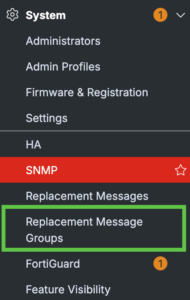
When you refresh the screen, you will see the Replacement Message Groups tab.
(On 6.4 and earlier the same setting lives under config system settings.)
Each group has a group type that determines which categories it can contain:
– utm groups can hold mail, http, webproxy, ftp, nntp, fortiguard-wf, spam, alertmail, admin, sslvpn, nac-quar, traffic-quota, utm, custom-message, and icap messages. These are used by UTM and security inspection.
– auth groups hold webproxy and auth messages, used by authentication pages in firewall policies.
Creating and applying a group (CLI)
config system replacemsg-group
edit "newutm"
set comment "UTM message group"
set group-type utm
config mail
edit "partial"
set buffer "Fragmented emails are blocked, sorry."
next
end
next
edit "newauth"
set comment "Authentication message group"
set group-type auth
config auth
edit "auth-success-msg"
set buffer "Welcome. Your authentication has been accepted, please reconnect."
next
end
next
end
Apply a group to a policy with the override field:
config firewall policy
edit 1
set inspection-mode proxy
set replacemsg-override-group "newauth"
next
end
To attach a group to an individual web filter profile instead of a policy, create the group, customize its `http` or `fortiguard-wf` messages, then reference it from the profile. This is the standard pattern when you want different block pages per department.
8. Use cases
– Branded block pages – Replace the generic FortiGuard block page with your logo, a help-desk contact, and an internal ticket link so users self-serve instead of flooding the help desk.
– Per-department messaging – Use message groups so HR, Legal, and Engineering each get policy-appropriate wording and escalation paths.
– Authentication portals – Customize captive-portal login, disclaimer, and success pages for guest WiFi or employee proxy auth.
– SSL-VPN portal errors – Tailor the messages users hit when a tunnel fails host-check or hits a login limit, pointing them at the right remediation.
– Quota and shaper notices – Explain to users why their traffic was throttled and what the policy is, reducing tickets.
– DLP and OCR blocks – Give a clear, compliance-approved explanation when data-loss-prevention catches a file or image.
– ZTNA virtual hosts – Recent FortiOS releases support a custom replacement message for ZTNA virtual hosts, useful for access-denied pages on published apps.
9. Limitations and gotchas
– No message means no display – Policies that drop or deny without returning content (for example, a non-proxied deny) never show a replacement page. The message system only fires when FortiGate terminates the session and replies.
– Flow vs proxy inspection matters – Some block pages render reliably only in proxy-based inspection. Flow mode can reset the connection rather than inject a page, especially for certain protocols, so a “missing” block page is often an inspection-mode issue, not a config error.
– HTTPS requires SSL inspection – Without deep inspection, the FortiGate cannot inject an HTML page into an encrypted session, so users get a browser TLS error instead of your branded page.
– Browser HSTS and pinning defeat injection – Even with SSL inspection, sites using HSTS or certificate pinning will refuse the FortiGate-injected page; the browser shows its own security error. There is nothing to fix in the replacement message itself.
– Extended View hides most messages – Covered above, but worth repeating because it wastes so much time.
– Groups are hidden by default – You must enable gui-replacement-message-groups before the menu appears.
– Group type locks categories – A utm group cannot hold auth messages and vice versa. Pick the right type at creation.
– Tag validity is per message type – A tag that works on one message renders as literal text on another. Use the scoped Insert Tag picker.
– Image bloat – Large base64 images enlarge the config and every backup, and slow page delivery. Keep them lean.
– VDOMs and HA – Messages are per-VDOM where VDOMs are enabled. In HA, customizations sync with the rest of the config, but confirm after failover if you edited during a split-brain window.
– Default reset on upgrade quirks -Heavily customized messages occasionally need review after major version upgrades if the underlying default template or available tags changed. Re-verify branded pages after a 7.x to 8.x jump.
10. Verification
After editing, confirm the message renders as intended end to end rather than trusting the GUI preview alone:
1. Generate the triggering condition from a client (visit a blocked category, trigger an AV catch with the EICAR test file, exceed a quota, etc.).
2. Confirm the page renders with your branding, working links, and expanded tags (no literal %%TAG%% text).
3. For HTTPS, confirm SSL inspection is active on the matching policy, otherwise expect a browser TLS error rather than your page.
4. Back up the config and confirm your replacemsg and replacemsg-group blocks are present, so the customization survives a rebuild.
Summary
Replacement messages turn FortiOS’s default block, auth, and error pages into branded, informative, policy-specific communication. Edit them in the GUI for speed (remember Extended View) or the CLI for repeatability, scope them with message groups (remember to enable them first), and validate by triggering the real condition. The recurring gotchas are all variations on one theme: a page only appears when FortiGate actually terminates the session and is able to inject content, which is why inspection mode, SSL inspection, and HSTS matter as much as the message body itself.
Recent posts
-

-

DNS is one of those technologies that quietly underpins... Full Story
-

BGP issues on FortiGate firewalls usually trace back to... Full Story
-

Every time your laptop talks to your router, a... Full Story
-

If you've spent any time configuring NAT on a... Full Story
-

If you have spent any time configuring firewall policies... Full Story
-

High availability on FortiGate is one of those features... Full Story
-

If you've configured SD-WAN on a FortiGate, you've almost... Full Story
-

FortiLink is the management protocol that turns a FortiSwitch... Full Story
-

FortiSwitches are pretty rock solid from Mean Time Between... Full Story
-

This is a quicky tip. Have you ever gone... Full Story
-

DNS is one of those quiet pieces of internet... Full Story
-

This article is an updated version of the previous... Full Story
-

You will add ns2 as a secondary (slave) BIND9... Full Story
-

In the process of deploying my lab, I needed... Full Story
-

RFC 8805, used to be known as Self-Correcting IP... Full Story
-

Years back, I wrote an article about certificate pinning. ... Full Story
-

FortiGates have the ability to send alerts to Microsoft... Full Story
-

In this post, I am going to walk through... Full Story
-

Troubleshooting VoIP on a FortiGate can feel like trying... Full Story
-

Prior to FortiOS 7.0, there were three commands to... Full Story
-

In this post, I am going to go over... Full Story
-

What we are going to do: We are going... Full Story
-

Choosing between FGCP (FortiGate Clustering Protocol) and FGSP (FortiGate... Full Story
-

Creating a VLAN on macOS (The "Pro" Move) A... Full Story
-

This blog post explores the logic behind how macOS... Full Story
-

Pretty Fly for a Wi-Fi Tell My Wi-Fi Love... Full Story
-

Part of my daily gig is creating BoMs (Bill-of-Materials)... Full Story
-

ICMP introduces several security risks, but careful filtering, rate... Full Story
-

The command diag debug application dhcps -1 enables full... Full Story
-

In the world of FortiOS, execute tac report is... Full Story
-

LLDP; What is it The Link Layer Discovery Protocol... Full Story
-

What it actually does When you run diagnose fdsm... Full Story
-

Monkey Bites are bite-sized, high-impact security insights designed for... Full Story
-

I have run macOS in macOS with Parallels but... Full Story
-

Don't be confused with my other FortiNAC posts where... Full Story
-

This is the third session in a multi-part article... Full Story
-

Today I was configuring key-based authentication on a FortiGate... Full Story
-

Netcat, often called the "Swiss Army knife" of networking,... Full Story
-

At its core, IEEE 802.1X is a network layer... Full Story
-

In case you did not see the previous FortiNAC... Full Story
-

This is our 5th session where we are going... Full Story
-

Now that we have Wireshark installed and somewhat configured,... Full Story
-

The Philosophy of Packet Analysis Troubleshooting isn't about looking... Full Story
-

InfoSecMonkey Threat Response October 24, 2026 | No fluff.... Full Story
-

InfoSecMonkey Threat Response October 24, 2026 | No fluff.... Full Story
-

Plus what you actually get with FortiCare Essential, Premium... Full Story