
If you've spent any time configuring user authentication on... Full Story
By Manny Fernandez
July 19, 2026
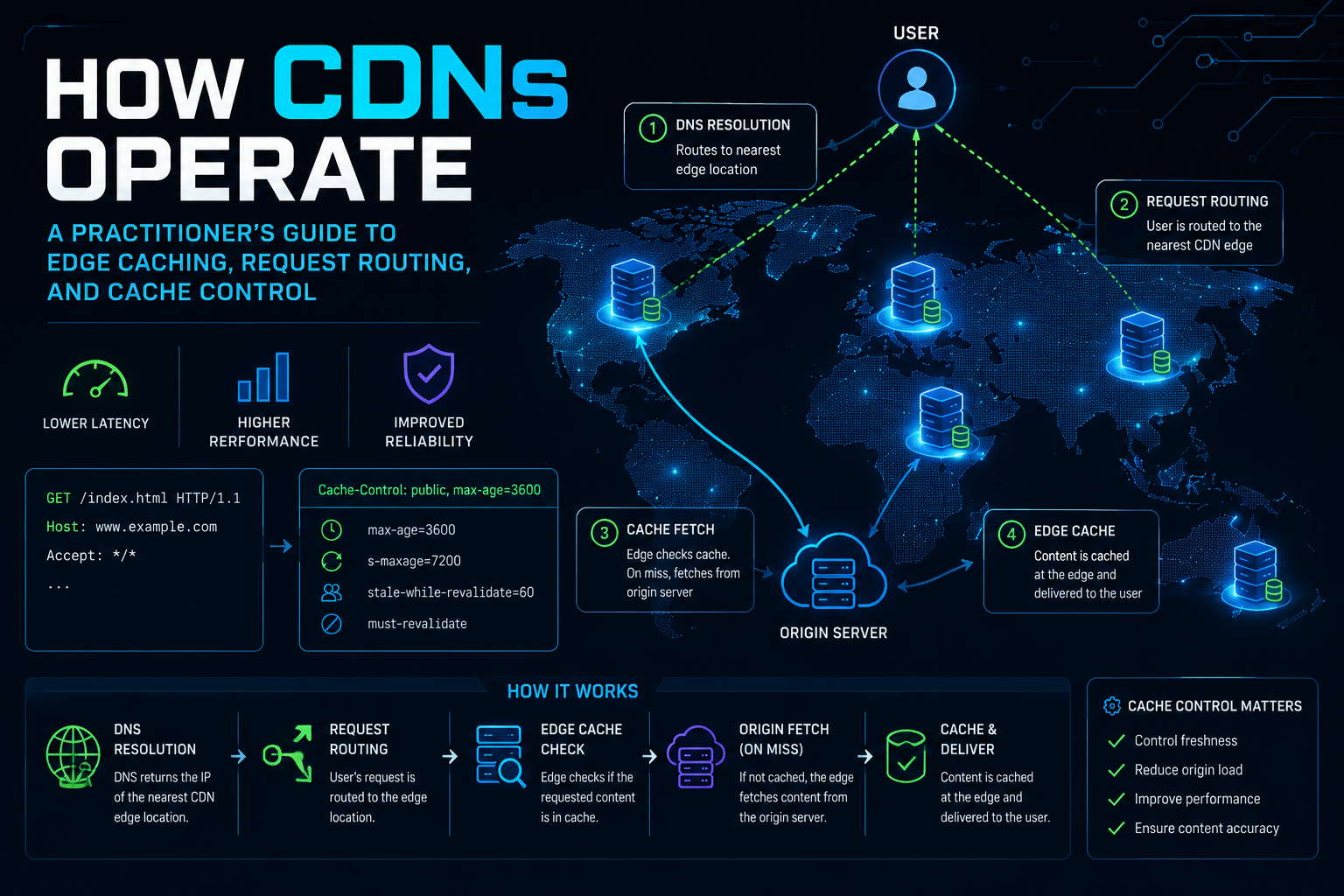
How CDNs Operate: A Practitioner’s Guide to Edge Caching, Request Routing, and Cache Control
1. Executive Summary
Objective. This guide explains, at the DNS-record and HTTP-header level, exactly what happens when a Content Delivery Network sits in front of your origin: how a client request is steered to the nearest edge Point of Presence (PoP), how that edge decides to serve from cache or fetch from origin, and how cache lifetime, validation, and purge are controlled. By the end you will be able to delegate a hostname to a CDN, set correct cache headers on your origin, and prove your hit ratio with real commands.
Why it matters. A misread cache header is the difference between a page that loads in 40 ms from an edge 20 miles away and one that crosses an ocean to your origin on every hit. It is also, less obviously, a security boundary: the same edge cache that saves you bandwidth can be poisoned or abused if the cache key is wrong. Understanding the mechanics lets you tune both performance and safety instead of guessing.
Target audience. Network engineers, DevOps and platform engineers, web infrastructure administrators, and security engineers who need to reason about caching, request routing, TLS termination at the edge, and WAF placement. The examples are vendor-neutral; the header and DNS behaviour is identical whether you run Cloudflare, Fastly, Amazon CloudFront, Akamai, or your own Varnish tier.
2. Prerequisites and Architecture
Assumed Knowledge
- DNS record types, specifically A, AAAA, and CNAME, and the idea of a resolver walking the delegation chain.
- The HTTP request and response model, including status codes and how request and response headers are exchanged.
- Basic TLS: what SNI is, and the fact that a certificate is bound to a hostname.
- A working idea of BGP and IP routing, enough to accept that one IP address can be announced from many locations (anycast).
Lab and Environment Requirements
- A domain you control, with access to its authoritative DNS zone.
- An account on any CDN provider. A free tier is enough to reproduce every step.
- An origin web server you can edit, running nginx or Apache. The nginx snippets below map one to one onto Apache directives.
- A workstation with
digandcurl. Everything is verified from the command line.
Component Table
| Component | Role | Example FQDN / IP |
|---|---|---|
| Client resolver | Recursive DNS the user’s device queries; its location influences routing decisions | 1.1.1.1 / 8.8.8.8 |
| CDN authoritative DNS | Answers for the CDN CNAME target and returns the optimal edge IP | ns.cdn.provider.net |
| Edge PoP | Terminates TLS, applies WAF, serves from cache or forwards to origin | Anycast VIP, e.g. 104.18.20.30 |
| Origin shield / mid-tier | Optional intermediate cache that collapses many edge misses into one origin fetch | shield.cdn.provider.net |
| Origin server | Your web server; the authoritative source of truth for content | origin.example.com / 203.0.113.10 |
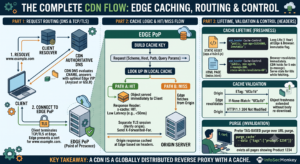
Mental model: a CDN is a globally distributed reverse proxy with a cache. Everything else in this guide is a detail of how that proxy is found (DNS and anycast), how long it keeps a copy (cache headers), and how it knows the copy is still good (validation and purge).
3. Step-by-Step Implementation Workflow
Phase 1: Trace the Request Lifecycle
Goal
Fix the sequence of events in your head before you touch a config file. Every decision later in this guide maps to one of these five stages.
The Flow
- Resolve. The client asks its resolver for
www.example.com. Because that name is a CNAME to the CDN, the CDN’s authoritative DNS ultimately answers with an edge IP. - Connect. The client opens a TCP and TLS session to that edge IP. The edge terminates TLS using a certificate for your hostname, so the client never talks to your origin directly.
- Match. The edge builds a cache key from the request (scheme, host, path, and selected query parameters) and looks it up in local storage.
- Serve or fetch. On a HIT the object is returned immediately. On a MISS the edge fetches from origin (or the origin shield), stores the response according to its cache headers, then returns it.
- Revalidate. When a cached object’s freshness lifetime expires, the edge does not blindly refetch. It sends a conditional request and often receives a cheap
304 Not Modified, extending the object’s life without transferring the body again.
Phase 2: Delegate the Hostname (DNS and Anycast Routing)
Goal
Point your public hostname at the CDN so that resolving it hands back an edge IP instead of your origin IP. This is the single change that puts the CDN in the path.
Action
Create a CNAME from your service hostname to the CDN-provided target. Your origin keeps its own A record on a separate name (for example origin.example.com) that is never published to end users.
zone: example.com
; Public name that users hit -> delegated to the CDN
www     IN  CNAME   www.example.com.cdn.provider.net.

; Private name the CDN pulls from -> never advertised to users
origin  IN  A       203.0.113.10
Apex domains: a bare
example.com cannot legally hold a CNAME alongside its SOA and NS records. Use your provider’s flattening feature (CNAME flattening, ALIAS, or ANAME) which resolves the target and serves the resulting A and AAAA records at the apex.Two routing techniques decide which edge IP you get back, and it helps to know which your provider uses:
| Technique | How the nearest PoP is chosen | Trade-off |
|---|---|---|
| Anycast | One VIP is announced from every PoP over BGP. The internet’s own routing carries the client to the topologically closest announcement. | Simple and fast to fail over, but “closest by BGP” is not always closest by latency. |
| DNS-based (GSLB) | The CDN’s authoritative DNS returns a different IP per region, using the resolver’s location or EDNS Client Subnet as a hint. | Finer control and health-aware steering, but accuracy depends on the resolver being near the user. |
GUI Verification
In the CDN dashboard, open DNS or Zones and confirm the record shows as Proxied, Accelerated, or the equivalent “traffic passes through the edge” flag. A record that is merely DNS-only resolves to your origin and bypasses the CDN entirely.
Phase 3: Configure the Origin and Origin Shield
Goal
Tell the edge where to fetch on a MISS, lock that path down so nobody can bypass the CDN, and optionally add a shield tier to protect the origin from a stampede of simultaneous misses.
Action
Set the origin hostname in the CDN, then restrict the origin firewall to accept HTTP only from the CDN’s published egress ranges. An origin reachable by the whole internet lets attackers skip your WAF and rate limiting.
origin: /etc/nginx/conf.d/origin.conf
server {
    listen 443 ssl;
    server_name origin.example.com;

    # Trust only the CDN's forwarded client IP header, and
    # only when the connection actually comes from the CDN.
    set_real_ip_from  198.51.100.0/24;   # <cdn_egress_range>
    real_ip_header    X-Forwarded-For;

    # Reject anything that did not arrive through the edge.
    if ($http_x_cdn_secret != "<shared_secret>") { return 403; }

    location / {
        proxy_pass http://127.0.0.1:8080;
    }
}
Origin shield: without it, 200 edge PoPs that all miss the same object make 200 requests to your origin. Enabling a shield funnels those misses through one designated mid-tier PoP, so the origin sees a single fetch and the other 199 edges pull from the shield. Enable it in the CDN’s Origin or Caching settings and pick a shield region close to your origin.
Phase 4: Control Cache Lifetime with Headers
Goal
Make the origin the authority on how long each response may live at the edge and in the browser. This is where most real-world performance is won or lost.
Action
Emit Cache-Control per content type. Give fingerprinted static assets a long life, and give HTML a short shared life with a stale window so the edge can keep serving while it revalidates.
origin: cache policy by content type
# Fingerprinted assets (app.a1b2c3.js) never change under
# a given name, so cache them for a year and mark immutable.
location ~* \.(css|js|woff2|png|jpg|svg)$ {
    add_header Cache-Control "public, max-age=31536000, immutable";
}

# HTML must stay fresh. Keep browsers from caching it (max-age=0)
# but let the shared CDN cache hold it for 5 minutes (s-maxage),
# and keep serving the old copy for 60s while fetching a new one.
location = /index.html {
    add_header Cache-Control "public, max-age=0, s-maxage=300, stale-while-revalidate=60";
}
The directives you will reach for most often:
| Directive | Effect |
|---|---|
max-age=N |
Freshness lifetime in seconds for any cache, including the browser. |
s-maxage=N |
Overrides max-age for shared caches only (the CDN). Lets you cache at the edge but not in the browser. |
public / private |
public allows shared caches to store it; private restricts storage to the end user’s browser. |
no-cache |
May be stored, but must be revalidated with the origin before every reuse. |
no-store |
Never written to any cache. Use for authenticated or sensitive responses. |
stale-while-revalidate=N |
Serve the expired copy for up to N seconds while fetching a fresh one in the background. Hides origin latency from users. |
immutable |
Tells the browser not to bother revalidating during the max-age window, even on reload. |
Phase 5: Understand the Cache Key and Validation
Goal
Control what makes two requests count as “the same object,” and let the edge refresh an object cheaply instead of re-downloading it.
By default the cache key is roughly scheme + host + path + query string. Two consequences follow immediately. First, /logo.png?utm_source=x and /logo.png?utm_source=y are cached as two separate objects even though they are byte-for-byte identical. Second, the Vary response header adds request headers to the key: Vary: Accept-Encoding is safe and correct, while Vary: User-Agent shatters your hit ratio into thousands of near-duplicate copies.
Action
Emit a validator so revalidation is cheap. When the freshness window ends, the edge sends the validator back and the origin answers 304 with no body if nothing changed.
# Origin response carries a validator:
ETag: "6f3a1b-1a2b"
Last-Modified: Sat, 18 Jul 2026 09:12:00 GMT

# When the edge revalidates, it asks conditionally:
If-None-Match: "6f3a1b-1a2b"

# Nothing changed, so the origin returns a body-less refresh:
HTTP/1.1 304 Not Modified
In the CDN dashboard, tune this under Caching -> Cache Key: strip or allow-list query parameters, ignore marketing tags, and decide whether cookies bust the cache. Most providers refuse to cache any response that carries a Set-Cookie header, which is a common silent cause of a zero hit ratio on static assets served by an application framework.
Phase 6: Invalidate Content on Deploy (Purge)
Goal
Remove or refresh cached objects on demand, without waiting for their TTL, so a deploy or a content fix reaches users immediately.
Action
Prefer tag-based purge over URL purge. Tag responses at the origin with a surrogate key, then purge the whole group with one API call. This lets you evict “every page that shows product 1234” without enumerating URLs.
# 1) Tag responses at the origin
add_header Cache-Tag "product-1234, catalog";

# 2) Purge every object carrying that tag (generic API shape)
curl -X POST "https://api.provider.net/zones/<zone_id>/purge_cache" \
     -H "Authorization: Bearer <api_token>" \
     -H "Content-Type: application/json" \
     --data '{"tags":["product-1234"]}'

# Purge a single URL when that is all you need
curl -X POST "https://api.provider.net/zones/<zone_id>/purge_cache" \
     -H "Authorization: Bearer <api_token>" \
     -H "Content-Type: application/json" \
     --data '{"files":["https://www.example.com/index.html"]}'
The purge you should avoid: a full “purge everything” on every deploy empties the cache globally and sends a wall of traffic straight to your origin. Reach for fingerprinted asset names plus a targeted HTML purge instead. See the stale-content gotcha below.
Phase 7: Terminate TLS at the Edge
Goal
Serve HTTPS to users from the edge, and keep the hop from edge to origin encrypted and authenticated so the CDN is not an accidental downgrade point.
The edge presents a certificate for your hostname (issued automatically over ACME by most CDNs) and terminates the client TLS session there. A second, separate TLS session runs from the edge to your origin. Make sure that second leg validates a real origin certificate rather than blindly trusting anything, which is the difference between end-to-end encryption and encryption only up to the edge.
# Origin listener presenting a valid cert for the edge to verify
server {
    listen 443 ssl;
    server_name origin.example.com;

    ssl_certificate     /etc/ssl/certs/origin.example.com.pem;
    ssl_certificate_key /etc/ssl/private/origin.example.com.key;

    ssl_protocols       TLSv1.2 TLSv1.3;
    ssl_ciphers         HIGH:!aNULL:!MD5;
}
In the dashboard set the origin TLS mode to the strictest option (often labelled Full (strict) or Verify origin). The permissive modes that accept a self-signed or absent origin certificate exist for lab convenience and should never ship to production.
4. Verification and Validation
Step 1: prove the name is delegated. The CNAME should chain to the CDN, and the resolved address should be an edge IP, not your origin.
$ dig +short www.example.com CNAME
www.example.com.cdn.provider.net.

$ dig +short www.example.com
104.18.20.30
172.64.150.40
Step 2: read the cache status headers. Request the same asset twice. The first response is typically a MISS; the second, from the same PoP, should flip to HIT with a rising Age.
$ curl -sSI https://www.example.com/static/app.a1b2c3.css
HTTP/2 200
cache-control: public, max-age=31536000, immutable
age: 8241
vary: Accept-Encoding
etag: "6f3a1b-1a2b"
x-cache: HIT
cf-cache-status: HIT
What success looks like:
| Signal | Healthy value |
|---|---|
Cache status header (x-cache / cf-cache-status) |
HIT on the second and later requests for cacheable assets |
Age header |
Present and increasing, always less than the effective max-age |
| Dashboard cache hit ratio | High for static (commonly 90 percent or more); low for genuinely dynamic HTML is expected |
| Origin request volume | A small fraction of edge request volume after the cache warms |
5. Troubleshooting and Gotchas
Gotcha 1: Everything is a MISS (dismal hit ratio)
Nearly always one of three causes: a Set-Cookie on static responses, a query string that varies per user, or a Cache-Control that forbids caching. Inspect the origin response directly, bypassing the edge, to see what the CDN is actually being told.
# Hit the origin directly, forcing the Host header
$ curl -sSI --resolve www.example.com:443:203.0.113.10 \
       https://www.example.com/static/app.a1b2c3.css \
  | grep -Ei 'cache-control|set-cookie|vary'

# Red flags in that output:
#   set-cookie: ...           -> most CDNs refuse to cache this
#   cache-control: private    -> shared caches will not store it
#   vary: user-agent          -> fragments the object per browser
Resolution: stop sending cookies on static paths, strip marketing query parameters from the cache key, replace private with public on genuinely public assets, and reduce Vary to Accept-Encoding only.
Gotcha 2: Users see stale content after a deploy
You shipped new CSS, but browsers and edges are still serving the old file because it was cached for a year under the same name. Confirm it with the Age and ETag headers on the live asset.
$ curl -sSI https://www.example.com/static/app.css | grep -Ei 'age|etag'
age: 431900          # ~5 days old, unchanged since the deploy
etag: "OLD-HASH"     # still the previous build
Resolution: stop caching by mutable name. Fingerprint every asset with a content hash (app.a1b2c3.css) so a new build is a new URL that was never cached, and keep the tiny HTML that references it on a short TTL. That way the long-lived assets never need purging at all, and only the HTML has to refresh. When you do need an immediate fix, tag-purge the specific HTML rather than purging everything.
Gotcha 3: Web cache poisoning through an unkeyed header
This is the security failure mode. If your application reflects a request header such as X-Forwarded-Host into the response (for example, to build absolute URLs), and that header is not part of the cache key, an attacker can send one poisoned request whose response gets cached and then served to every subsequent visitor.
# The probe: does an unkeyed header change the cached body?
$ curl -sS https://www.example.com/ \
       -H 'X-Forwarded-Host: evil.attacker.test' \
  | grep -i 'evil.attacker.test'

# If the injected host appears in the response body, and the
# next plain request returns the SAME poisoned body, the cache
# is storing attacker-controlled content.
Resolution: the fix is defence in depth, not a single toggle.
- Stop reflecting request headers into cacheable responses. Derive hostnames from server config, not from client input.
- Have the edge strip or normalise non-standard forwarding headers (
X-Forwarded-Host,X-Original-URL, and similar) before they reach the origin. - If a header genuinely must change the response, add it to the cache key so poisoned and clean variants are stored separately and never cross over.
The rule underneath all three gotchas: anything that influences the response body must be part of the cache key, and nothing that does not influence the body should be. Get that mapping right and both your hit ratio and your cache security follow from it.
Recent posts
-

-

DNS is one of those technologies that quietly underpins... Full Story
-

BGP issues on FortiGate firewalls usually trace back to... Full Story
-

Every time your laptop talks to your router, a... Full Story
-

If you've spent any time configuring NAT on a... Full Story
-

If you have spent any time configuring firewall policies... Full Story
-

High availability on FortiGate is one of those features... Full Story
-

If you've configured SD-WAN on a FortiGate, you've almost... Full Story
-

FortiLink is the management protocol that turns a FortiSwitch... Full Story
-

FortiSwitches are pretty rock solid from Mean Time Between... Full Story
-

This is a quicky tip. Have you ever gone... Full Story
-

DNS is one of those quiet pieces of internet... Full Story
-

This article is an updated version of the previous... Full Story
-

You will add ns2 as a secondary (slave) BIND9... Full Story
-

In the process of deploying my lab, I needed... Full Story
-

RFC 8805, used to be known as Self-Correcting IP... Full Story
-

Years back, I wrote an article about certificate pinning. ... Full Story
-

FortiGates have the ability to send alerts to Microsoft... Full Story
-

In this post, I am going to walk through... Full Story
-

Troubleshooting VoIP on a FortiGate can feel like trying... Full Story
-

Prior to FortiOS 7.0, there were three commands to... Full Story
-

In this post, I am going to go over... Full Story
-

What we are going to do: We are going... Full Story
-

Choosing between FGCP (FortiGate Clustering Protocol) and FGSP (FortiGate... Full Story
-

Creating a VLAN on macOS (The "Pro" Move) A... Full Story
-

This blog post explores the logic behind how macOS... Full Story
-

Pretty Fly for a Wi-Fi Tell My Wi-Fi Love... Full Story
-

Part of my daily gig is creating BoMs (Bill-of-Materials)... Full Story
-

ICMP introduces several security risks, but careful filtering, rate... Full Story
-

The command diag debug application dhcps -1 enables full... Full Story
-

In the world of FortiOS, execute tac report is... Full Story
-

LLDP; What is it The Link Layer Discovery Protocol... Full Story
-

What it actually does When you run diagnose fdsm... Full Story
-

Monkey Bites are bite-sized, high-impact security insights designed for... Full Story
-

I have run macOS in macOS with Parallels but... Full Story
-

Don't be confused with my other FortiNAC posts where... Full Story
-

This is the third session in a multi-part article... Full Story
-

Today I was configuring key-based authentication on a FortiGate... Full Story
-

Netcat, often called the "Swiss Army knife" of networking,... Full Story
-

At its core, IEEE 802.1X is a network layer... Full Story
-

In case you did not see the previous FortiNAC... Full Story
-

This is our 5th session where we are going... Full Story
-

Now that we have Wireshark installed and somewhat configured,... Full Story
-

The Philosophy of Packet Analysis Troubleshooting isn't about looking... Full Story
-

Executive Summary Objective: Get you from zero to writing... Full Story
-

NAND cells, the flash translation layer, SLC caching, TRIM,... Full Story
-

Nmap Scripting Engine (NSE): From One-Liners to Your First... Full Story