
If you've spent any time configuring user authentication on... Full Story
By Manny Fernandez
July 14, 2026
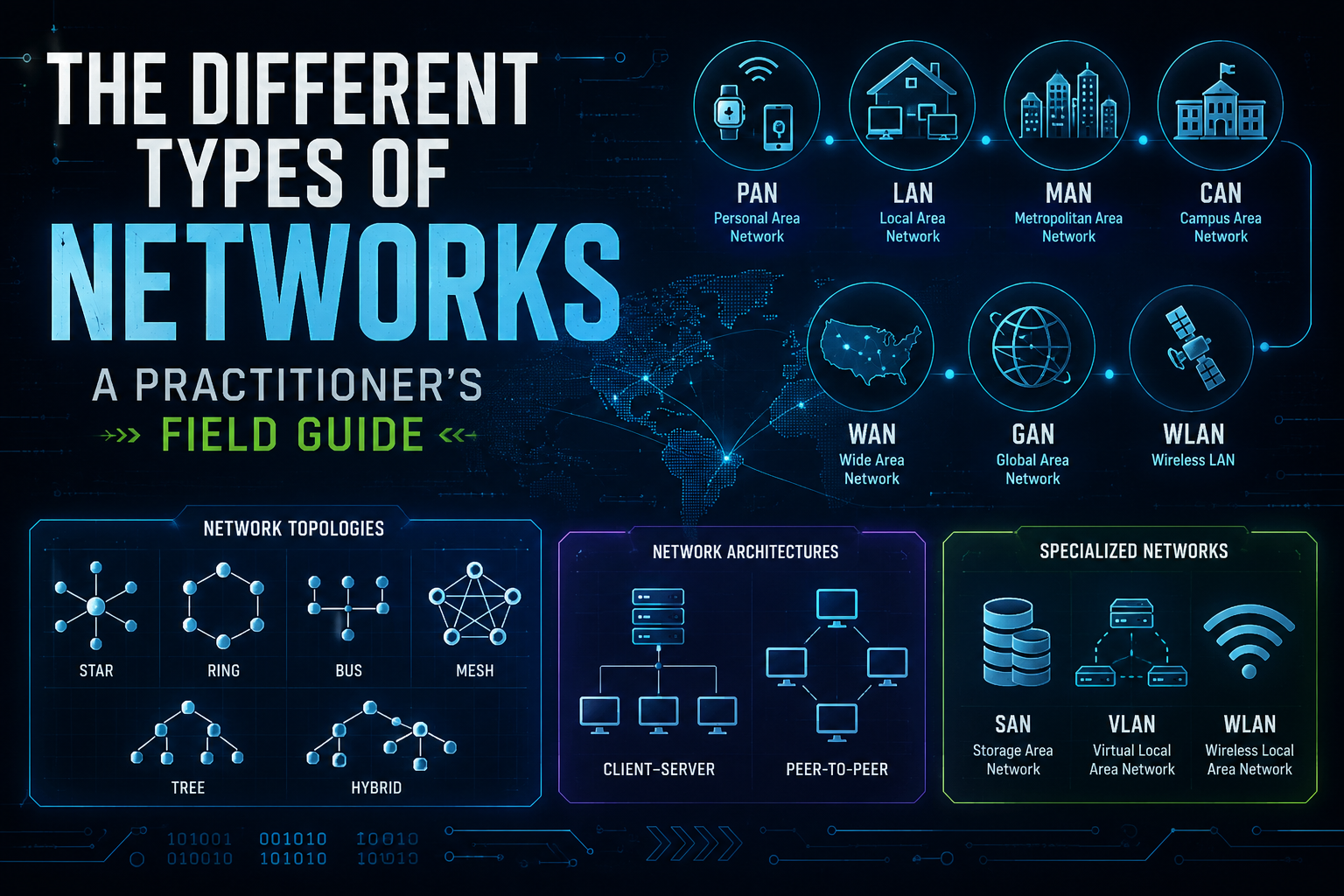
The Different Types of Networks: A Practitioner’s Field Guide
Ask ten engineers to define “a network” and you will get ten answers that are all correct and none of them complete. The word covers everything from two phones swapping a file over Bluetooth to the global backbone that carries this page to your screen. The reason the term feels slippery is that networks get classified along several different axes at once. Scale is one axis. Topology is another. Architecture and purpose are two more.
This post breaks networks down the way you actually reason about them in the field: by geographic scale, by physical and logical topology, by architecture, and by the specialized types that show up in real deployments. By the end you should be able to look at any environment and name what you are looking at in more than one dimension.
Networks by Geographic Scale
This is the classification most people learn first, and it is the one that maps cleanly to physical distance and administrative boundaries. The categories run from a few centimeters to the entire planet.
PAN (Personal Area Network)
A PAN is the smallest unit, built around a single person and measured in meters. Your phone paired to a smartwatch, a wireless headset, or a fitness tracker is a PAN in action. The dominant technology here is Bluetooth, with newer low-energy variants (BLE) optimized for battery life over throughput. NFC and Zigbee also live in this space.
PANs are intentionally short range. That limited reach is a security feature as much as a physical constraint, because an attacker generally has to be within a few meters to interact with the link.
LAN (Local Area Network
A LAN covers a bounded area under one administrative control: a home, a floor, an office, a data center. This is where most day-to-day networking happens. Ethernet (the IEEE 802.3 family) handles the wired side, and Wi-Fi (802.11) handles the wireless side.
The defining traits of a LAN are high bandwidth, low latency, and single ownership. Because you own every switch and cable in the path, you get to decide the VLAN structure, the addressing scheme, and the security policy. Speeds of 1 Gbps to the desktop are baseline today, with 10, 25, and 40 Gbps common in the server and uplink layers.
CAN (Campus Area Network)
A CAN stitches multiple LANs together across a limited geographic area that you still own or control, such as a university campus, a hospital system, or a corporate headquarters with several buildings. Fiber runs between buildings, and a core layer of switches or routers ties the building LANs into one contiguous environment.
The distinction from a plain LAN is scale and structure. A CAN forces you to think about a hierarchical design (access, distribution, core), inter-building routing, and consistent policy across sites that are physically separated but administratively unified.
MAN (Metropolitan Area Network)
A MAN spans a city or a large metro region. Think of a municipal network connecting government buildings across a downtown core, or a service provider offering Metro Ethernet to businesses in the same city. The distances are larger than a campus but smaller than a wide area network, typically up to tens of kilometers.
MANs frequently blur into carrier territory, because covering a metro often means leasing or building fiber that crosses public rights of way. Technologies like Metro Ethernet, MPLS, and carrier-grade optical transport show up at this scale.
WAN (Wide Area Network)
A WAN connects sites across cities, regions, or countries. The moment your traffic leaves a building and crosses a distance you do not own, you are almost certainly on a WAN. The internet itself is the largest WAN in existence.
The critical shift with WANs is ownership. You rarely own the links in the middle. You lease connectivity from carriers, buy internet transit, or ride overlay tunnels across someone else’s infrastructure. That is why WAN design leans heavily on encryption, redundancy, and intelligent path selection. A multi-site enterprise connecting branches to a hub with IPsec tunnels over the public internet is running a WAN, and the reliability of that WAN is a design problem you own even when the transport is not.
GAN (Global Area Network)
A GAN is the largest classification, spanning continents and often combining satellite links, undersea cables, and terrestrial WANs into one global fabric. Multinational enterprises and the internet backbone operate at this scale. In practice, most people treat the internet as the reference GAN and design their own footprint as a collection of WANs that ride on top of it.
Networks by Topology
Scale tells you how far a network reaches. Topology tells you how the pieces connect. There is a physical topology (how the cables actually run) and a logical topology (how data actually flows), and the two do not always match.
Bus
Every device connects to a single shared backbone cable. It was cheap and simple, which is why early Ethernet used it, but a single break anywhere on the backbone takes down the whole segment. It is largely historical now.
Star
Every device connects to a central node, usually a switch. This is the dominant physical topology in modern LANs. If one link fails, only that one device drops. The tradeoff is that the central switch becomes a single point of failure, which is why distribution and core layers get redundant hardware.
Ring
Devices connect in a closed loop, and data travels around the ring. Older token-passing networks used this, and some resilient fiber designs still do, often as a dual counter-rotating ring so a single break can heal by reversing direction.
Mesh
Devices interconnect with multiple redundant paths. In a full mesh, every node connects to every other node, which gives excellent resilience at the cost of a connection count that explodes as you add nodes. Partial mesh is the practical compromise and is extremely common in WAN and overlay design, where you want more than one path but not every possible path.
Tree and Hybrid
A tree topology arranges star networks into a hierarchy, which is exactly what the access, distribution, and core model looks like in a campus. Hybrid topologies mix several of the above, and in reality almost every production network is a hybrid: star at the access edge, mesh across the WAN, and hierarchy tying it together.
Networks by Architecture
Architecture describes the relationship between the devices on the network, specifically who serves and who consumes.
Client-Server
Resources are centralized on dedicated servers, and clients request services from them. Authentication, file storage, email, and databases all follow this model. It scales well, centralizes control and backup, and makes security policy enforceable from one place. The tradeoff is that the servers become critical infrastructure that must be protected and made redundant.
Peer-to-Peer
Every device acts as both client and server, sharing resources directly with no central authority. Small home and office file sharing works this way, as do distributed systems like BitTorrent and blockchain networks. Peer-to-peer is cheap and resilient against single points of failure, but it is hard to secure and manage at scale because there is no central place to enforce policy.
Specialized and Modern Network Types
Beyond the classic scale and topology labels, several purpose-built network types dominate real deployments. These are the ones you configure, not just diagram.
WLAN (Wireless Local Area Network)
A WLAN is a LAN where the access layer is wireless. Built on the 802.11 (Wi-Fi) standards, it trades the deterministic performance of copper for mobility. Modern Wi-Fi (Wi-Fi 6 and 6E, with Wi-Fi 7 arriving) closes much of the throughput gap, but a WLAN still demands attention to RF design, channel planning, and airtime that a wired LAN never requires. Security here leans on WPA3 and increasingly on standards like OWE for open networks and 802.1X for enterprise authentication.
SAN (Storage Area Network)
A SAN is a dedicated high-speed network that presents block-level storage to servers as if it were locally attached. It runs on Fibre Channel or on IP-based protocols like iSCSI and FCoE. The point of a SAN is to decouple storage from individual servers so that capacity can be pooled, shared, and managed centrally. Do not confuse a SAN with a LAN carrying file shares. A SAN operates at the block level and is usually physically or logically isolated from general traffic for both performance and security reasons.
VLAN (Virtual Local Area Network)
A VLAN slices one physical switch infrastructure into multiple isolated logical LANs. Devices in different VLANs cannot talk to each other without passing through a router or firewall, even if they plug into the same switch. VLANs are the workhorse of network segmentation. They separate voice from data, guests from employees, and production from management, and they let you apply security policy at the boundaries between segments. Traffic between VLANs on trunk links is tagged using the 802.1Q standard.
VPN (Virtual Private Network)
A VPN creates an encrypted tunnel across an untrusted network, most often the public internet, so that two endpoints behave as if they share a private link. There are two broad flavors. Site-to-site VPNs connect entire networks, typically with IPsec, and are the backbone of multi-branch enterprise connectivity. Remote-access VPNs connect individual users back to a corporate network, using IPsec or SSL/TLS. A VPN is what lets a WAN ride safely over infrastructure you do not own, and its security depends on the strength of the encryption and the discipline of the key management behind it.
SD-WAN (Software-Defined Wide Area Network)
SD-WAN is the modern evolution of WAN design. Instead of pinning traffic to a single expensive private circuit, SD-WAN pools multiple transports (broadband, LTE or 5G, MPLS) and steers traffic across them based on real-time measurements of latency, jitter, and loss. Application-aware policy decides that voice takes the cleanest path while a backup job takes the cheapest one. When a link degrades, sessions fail over without dropping. SD-WAN typically layers encrypted overlay tunnels across whatever underlay transport is available, which means it delivers WAN reach, VPN security, and intelligent path selection in one design.
Overlay Networks
An overlay is a logical network built on top of another network (the underlay), usually with tunneling. VXLAN, GRE, and IPsec tunnels all create overlays. The value is abstraction. The overlay does not care about the physical topology underneath it, so you can build a consistent logical fabric across sites, clouds, and transports that look nothing alike at the physical layer. Dual-hub, dual-overlay VPN designs, common in resilient multi-site enterprises, are overlay networks engineered so that no single hub or transport failure takes the whole fabric down.
How These Classifications Fit Together
The key insight is that these categories are not mutually exclusive. They stack. A single real environment is described by all four axes at once.
Take a multi-site business with branches in several cities. Each branch runs a wired LAN in a star topology at the access layer, with a WLAN riding alongside it for mobility. Inside each site, VLANs segment the traffic. A client-server architecture centralizes authentication and file services. The branches connect back to regional hubs over a WAN, and that WAN is implemented as an SD-WAN pooling broadband and cellular, secured by IPsec VPN tunnels forming a partial-mesh overlay across the underlay transport. Zoom all the way out and the whole thing rides on the internet, the reference GAN.
Every one of those labels is correct simultaneously. That is why the question “what type of network is this” almost always has more than one answer, and why naming a network in only one dimension usually means you are missing part of the picture.
The Bottom Line
Networks get classified by scale (PAN, LAN, CAN, MAN, WAN, GAN), by topology (bus, star, ring, mesh, tree, hybrid), by architecture (client-server, peer-to-peer), and by specialized purpose (WLAN, SAN, VLAN, VPN, SD-WAN, overlay). None of these axes replaces the others. They describe different properties of the same infrastructure.
When you can name a network in all four dimensions at once, you are not just labeling it. You are describing its reach, its failure modes, its trust boundaries, and its security posture in a single breath. That is the difference between memorizing acronyms and actually understanding what you are looking at.
Recent posts
-

-

DNS is one of those technologies that quietly underpins... Full Story
-

BGP issues on FortiGate firewalls usually trace back to... Full Story
-

Every time your laptop talks to your router, a... Full Story
-

If you've spent any time configuring NAT on a... Full Story
-

If you have spent any time configuring firewall policies... Full Story
-

High availability on FortiGate is one of those features... Full Story
-

If you've configured SD-WAN on a FortiGate, you've almost... Full Story
-

FortiLink is the management protocol that turns a FortiSwitch... Full Story
-

FortiSwitches are pretty rock solid from Mean Time Between... Full Story
-

This is a quicky tip. Have you ever gone... Full Story
-

DNS is one of those quiet pieces of internet... Full Story
-

This article is an updated version of the previous... Full Story
-

You will add ns2 as a secondary (slave) BIND9... Full Story
-

In the process of deploying my lab, I needed... Full Story
-

RFC 8805, used to be known as Self-Correcting IP... Full Story
-

Years back, I wrote an article about certificate pinning. ... Full Story
-

FortiGates have the ability to send alerts to Microsoft... Full Story
-

In this post, I am going to walk through... Full Story
-

Troubleshooting VoIP on a FortiGate can feel like trying... Full Story
-

Prior to FortiOS 7.0, there were three commands to... Full Story
-

In this post, I am going to go over... Full Story
-

What we are going to do: We are going... Full Story
-

Choosing between FGCP (FortiGate Clustering Protocol) and FGSP (FortiGate... Full Story
-

Creating a VLAN on macOS (The "Pro" Move) A... Full Story
-

This blog post explores the logic behind how macOS... Full Story
-

Pretty Fly for a Wi-Fi Tell My Wi-Fi Love... Full Story
-

Part of my daily gig is creating BoMs (Bill-of-Materials)... Full Story
-

ICMP introduces several security risks, but careful filtering, rate... Full Story
-

The command diag debug application dhcps -1 enables full... Full Story
-

In the world of FortiOS, execute tac report is... Full Story
-

LLDP; What is it The Link Layer Discovery Protocol... Full Story
-

What it actually does When you run diagnose fdsm... Full Story
-

Monkey Bites are bite-sized, high-impact security insights designed for... Full Story
-

I have run macOS in macOS with Parallels but... Full Story
-

Don't be confused with my other FortiNAC posts where... Full Story
-

This is the third session in a multi-part article... Full Story
-

Today I was configuring key-based authentication on a FortiGate... Full Story
-

Netcat, often called the "Swiss Army knife" of networking,... Full Story
-

At its core, IEEE 802.1X is a network layer... Full Story
-

In case you did not see the previous FortiNAC... Full Story
-

This is our 5th session where we are going... Full Story
-

Now that we have Wireshark installed and somewhat configured,... Full Story
-

The Philosophy of Packet Analysis Troubleshooting isn't about looking... Full Story
-

InfoSecMonkey Threat Response October 24, 2026 | No fluff.... Full Story
-

InfoSecMonkey Threat Response October 24, 2026 | No fluff.... Full Story
-

Plus what you actually get with FortiCare Essential, Premium... Full Story