
If you've spent any time configuring user authentication on... Full Story
By Manny Fernandez
May 16, 2026
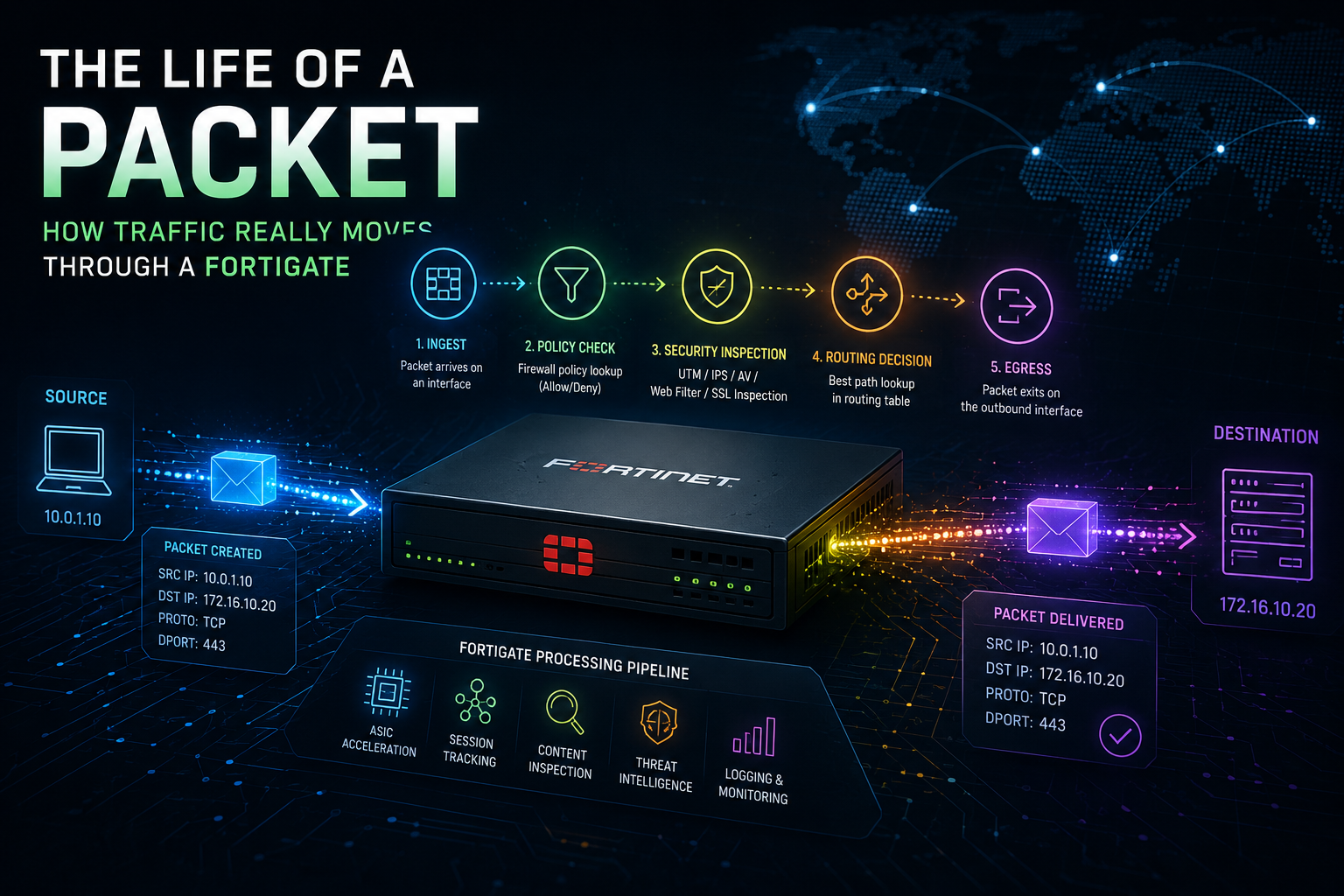
The Life of a Packet: How Traffic Really Moves Through a FortiGate
If you’ve ever stared at a FortiGate session and wondered exactly where in the pipeline your packet was when it got dropped (was it the kernel, the IPS engine, the WAD proxy, or somewhere in between?), this post is for you. We’ll walk a packet from the moment it hits an ingress interface to the moment it leaves on the other side, and along the way we’ll untangle three things people regularly mix up:
- Flow-based vs. proxy-based inspection (a policy setting that controls how UTM scans content)
- Profile mode vs. policy mode (a VDOM setting that controls how policies themselves are built)
- The actual order of operations the FortiGate uses to make all of this work
Let’s start with the journey.
Part 1: The Stages of FortiGate Packet Flow
Fortinet calls this “Parallel Path Processing,” but most engineers just call it the life of a packet. On a FortiGate without NP offload (so we can see every stage), the packet goes through roughly the following steps, in order.
1. Ingress: TCP/IP Stack
The packet arrives on a physical or virtual interface. The network driver hands it to the kernel’s TCP/IP stack, which records the source interface, VLAN, and basic Layer 2/3 information.
2. DoS Policy and IP Integrity Check
This happens very early, before any firewall policy lookup. The DoS module inspects all flows but specifically tracks the packet types attackers abuse (TCP SYN floods, etc.) to make sure they’re within configured thresholds. Right alongside it, IP integrity header checking verifies that the packet is a structurally valid TCP, UDP, ICMP, SCTP, or GRE packet, checking protocol header length and basic sanity. Malformed packets die here.
3. IPsec VPN Decryption
If the packet arrived inside an IPsec tunnel, it’s decrypted now so the rest of the pipeline can see the real inner source/destination.
4. Destination NAT (DNAT) / VIP Lookup
DNAT happens before routing. The FortiGate checks whether the destination address matches a VIP or DNAT rule and rewrites the destination so that routing can pick the correct egress interface.
5. Routing
The kernel consults the routing table (and SD-WAN rules, if configured) to determine the egress interface. This step is critical because firewall policies are matched on source AND destination interface, and the destination interface isn’t known until routing finishes.
6. Policy Lookup / Stateful Inspection
This is where the firewall policy table comes into play. Stateful inspection looks at the first packet of a session, matches it against the policy table using the 5-tuple (source IP, destination IP, source port, destination port, protocol) plus source/destination interface, and makes a security decision for the entire session. If matched and allowed, the session is added to the session table. Every subsequent packet in that session does a fast session-table lookup instead of re-walking the policy list.
If no policy matches → implicit deny → drop.
7. Session Helpers (for protocols that need them)
Protocols like SIP, FTP, and others embed IP/port information inside the payload. Session helpers parse those payloads and open the necessary pinholes so the secondary data channels actually work.
8. User Authentication & Device Identification
If the matched policy requires authentication or device ID, it’s enforced now, after policy match, which is why FortiGate authentication is fundamentally IP-based.
9. SSL VPN Termination (if applicable)
SSL VPN traffic terminates at the FortiGate, gets decrypted, and is re-injected into the pipeline against the SSL VPN interface for a fresh policy lookup.
10. UTM / NGFW Inspection
This is the big one, and it’s where flow-based vs. proxy-based actually diverges. We’ll cover this in detail in Part 2.
11. Source NAT (SNAT) and IPsec Encryption
After UTM, the kernel checks the NAT table and applies SNAT if the policy calls for it (or if a Central SNAT rule matches). If the packet is heading into an IPsec tunnel, it’s encrypted and encapsulated here.
12. Egress
The kernel hands the packet to the egress interface driver, and it goes out on the wire.
Part 2: Flow-Based vs. Proxy-Based Inspection
Step 10 above (UTM/NGFW inspection) runs in one of two architectures, and the choice has real consequences for performance, accuracy, and which features you can even use.
Flow-Based Inspection
Flow-based inspection is performed by the IPS engine. Packets stream through and are scanned in real time using single-pass Direct Filter Approach (DFA) pattern matching, with offload to CP8/CP9 ASICs where available.
All applicable flow-based modules run simultaneously in one pass:
- IPS
- Application Control
- Flow-based Web Filtering
- Flow-based DLP
- Flow-based AntiVirus (which caches files during protocol decoding and submits them for scanning while the other modules keep working)
- Botnet C&C checking
Characteristics:
- Packet-by-packet, no buffering of the full object
- Fewer system resources, lower latency, faster user experience
- The FortiGate doesn’t sit “between” the client and server in the same way; it observes and can reset
- Higher chance of false positives/negatives compared to proxy mode
- When a threat is found mid-stream, the typical action is a
TCPreset; rich replacement messages are limited because the fullHTTPobject wasn’t reassembled
Proxy-Based Inspection
Proxy-based inspection is performed by the WAD daemon (the FortiOS UTM/NGFW proxy). Despite the name, proxy-based inspection is actually a mixture of flow and proxy processing.
The order inside the proxy-based pipeline:
- Packets first hit the IPS engine for flow-based IPS, Application Control, and botnet checking
- Packets are handed to the WAD proxy
- The proxy decides whether traffic is SSL that should be decrypted (decryption is offloaded to
CP8/CP9) - The proxy reconstructs and caches full content objects (files, web pages, emails) from the session
- Content inspection runs against the cached object in this order:
VoIP inspection→DLP→Email Filter (Anti-Spam)→Web Filtering→AntiVirus→ICAP - If the object is clean, it’s relayed to the destination
- If a threat is found, the proxy blocks it and substitutes a replacement message
- For decrypted SSL traffic, the proxy hands data back to the IPS engine for IPS/AppControl, then back to itself for proxy-based inspection of the decrypted payload
Characteristics:
- Two TCP circuits effectively exist: client-to-FortiGate and FortiGate-to-server
- The whole object is examined before a decision, which means more accuracy and fewer false positives
- More features available: WAF, full Email Filter, full DLP, ICAP, certain Web Filter options
- Higher CPU and memory cost; higher latency
- Replacement pages and block messages display properly because the FortiGate is a true middle-man
Picking Between Them
You set this per firewall policy (since FortiOS 6.2). Before 6.2, it was a VDOM-wide setting. A quick rule of thumb:
- Flow-based when you want maximum throughput and your security needs are covered by IPS, AV, App Control, and basic web filtering
- Proxy-based when you need WAF, full anti-spam, ICAP integration, or you want the most thorough AV/web filter accuracy
- You can mix: one policy doing flow-based AV+IPS for general egress, another policy doing proxy-based WAF for inbound traffic to web servers
One subtle point worth knowing: even on a flow-based policy, you can attach a profile that is itself configured for proxy-based inspection (this is allowed for some profiles). That mixed configuration has tripped up plenty of engineers in the certification labs.
Part 3: Profile Mode vs. Policy Mode (NGFW Modes)
This is the part everyone confuses with flow-vs-proxy. It’s a separate setting entirely. NGFW mode controls how you build firewall policies, specifically whether application and URL category matching live inside profiles or inside the policy itself.
NGFW mode is set per VDOM under System > Settings > NGFW Mode.
NGFW Profile-Based Mode (the default)
This is the traditional FortiGate experience:
- Firewall policies match traffic on the network 5-tuple (source/destination IP, ports, protocol, interfaces)
- Security inspection is performed by separate profiles (AntiVirus, Web Filter, Application Control, IPS, DLP, etc.) that you build independently and then attach to a firewall policy
- Inspection only happens after the firewall policy is matched, and only if profiles are attached
- Supports both flow-based and proxy-based inspection modes
- NAT can be done per-policy or via Central NAT, your choice
This is what most documentation, courseware, and YouTube tutorials assume you’re running. It’s flexible, granular, and matches how Fortinet has historically operated.
NGFW Policy-Based Mode
Introduced in FortiOS 5.6 as a more “Palo Alto-style” way of writing rules:
- Application and URL category matching are part of the security policy itself, with no separate App Control or category-based Web Filter profiles required
- Matching is handled by a special Policy Match Engine that lives inside the IPS engine
- Only available when the VDOM is in flow-based inspection mode; there is no proxy-based option here
- Central SNAT is always enabled (not optional). If you don’t have a Central SNAT policy, you must create one
- Uses a separate SSL Inspection & Authentication policy as a pre-match step that handles SSL decryption profile and user authentication before the security policy is evaluated
- All traffic is inspected by the IPS engine even when no security action is configured, so CPU utilization tends to be higher
A few practical gotchas:
- Switching from profile-based to policy-based wipes your existing IPv4 and IPv6 firewall policies. This is not a conversion; it’s a reset. Plan accordingly, and ideally test in a separate VDOM
- Application Control profiles cease to exist as standalone objects in this mode
- Web Filter profiles still exist but no longer handle category-based filtering; that moves into the policy
- The classic “catch-all deny at the bottom” pattern can have surprising consequences in policy-based mode, because matching now depends on Layer 7 identification
Which Should You Use?
Profile-based mode is the right choice for most deployments. It’s more flexible, supports both inspection architectures, gives you per-policy NAT, and matches the way the bulk of Fortinet documentation and community knowledge is written. The argument for policy-based mode is mostly about simpler, application-centric rule writing. It’s useful if your team is migrating from a vendor that already works that way, or if you genuinely prefer centralized NAT and Layer-7-aware policy matching.
Putting It All Together
So when someone asks “what processes the packet first?”, the honest answer is a stack:
- The kernel handles the early stages: interface ingress, DoS, IP integrity, IPsec decrypt, DNAT, routing, policy lookup, stateful inspection, session helpers, authentication
- If the matched policy has security profiles, the IPS engine handles flow-based UTM (and the early IPS/AppControl/botnet pass even when proxy mode is configured)
- If the policy is proxy-based, the WAD daemon then takes over for content reconstruction and the VoIP → DLP → AntiSpam → Web Filter → AntiVirus → ICAP inspection chain
- The packet returns to the kernel for SNAT, IPsec encrypt, and egress
Flow-vs-proxy decides how the UTM step works. Profile-vs-policy mode decides how you author the rules that lead the packet into that UTM step in the first place. They’re orthogonal, and once you stop conflating them, FortiGate troubleshooting gets a lot less mysterious.
The next time a session debug shows your packet dying somewhere unexpected, you’ll know exactly which stage to interrogate.
Recent posts
-

-

DNS is one of those technologies that quietly underpins... Full Story
-

BGP issues on FortiGate firewalls usually trace back to... Full Story
-

Every time your laptop talks to your router, a... Full Story
-

If you've spent any time configuring NAT on a... Full Story
-

If you have spent any time configuring firewall policies... Full Story
-

High availability on FortiGate is one of those features... Full Story
-

If you've configured SD-WAN on a FortiGate, you've almost... Full Story
-

FortiLink is the management protocol that turns a FortiSwitch... Full Story
-

FortiSwitches are pretty rock solid from Mean Time Between... Full Story
-

This is a quicky tip. Have you ever gone... Full Story
-

DNS is one of those quiet pieces of internet... Full Story
-

This article is an updated version of the previous... Full Story
-

You will add ns2 as a secondary (slave) BIND9... Full Story
-

In the process of deploying my lab, I needed... Full Story
-

RFC 8805, used to be known as Self-Correcting IP... Full Story
-

Years back, I wrote an article about certificate pinning. ... Full Story
-

FortiGates have the ability to send alerts to Microsoft... Full Story
-

In this post, I am going to walk through... Full Story
-

Troubleshooting VoIP on a FortiGate can feel like trying... Full Story
-

Prior to FortiOS 7.0, there were three commands to... Full Story
-

In this post, I am going to go over... Full Story
-

What we are going to do: We are going... Full Story
-

Choosing between FGCP (FortiGate Clustering Protocol) and FGSP (FortiGate... Full Story
-

Creating a VLAN on macOS (The "Pro" Move) A... Full Story
-

This blog post explores the logic behind how macOS... Full Story
-

Pretty Fly for a Wi-Fi Tell My Wi-Fi Love... Full Story
-

Part of my daily gig is creating BoMs (Bill-of-Materials)... Full Story
-

ICMP introduces several security risks, but careful filtering, rate... Full Story
-

The command diag debug application dhcps -1 enables full... Full Story
-

In the world of FortiOS, execute tac report is... Full Story
-

LLDP; What is it The Link Layer Discovery Protocol... Full Story
-

What it actually does When you run diagnose fdsm... Full Story
-

Monkey Bites are bite-sized, high-impact security insights designed for... Full Story
-

I have run macOS in macOS with Parallels but... Full Story
-

Don't be confused with my other FortiNAC posts where... Full Story
-

This is the third session in a multi-part article... Full Story
-

Today I was configuring key-based authentication on a FortiGate... Full Story
-

Netcat, often called the "Swiss Army knife" of networking,... Full Story
-

At its core, IEEE 802.1X is a network layer... Full Story
-

In case you did not see the previous FortiNAC... Full Story
-

This is our 5th session where we are going... Full Story
-

Now that we have Wireshark installed and somewhat configured,... Full Story
-

The Philosophy of Packet Analysis Troubleshooting isn't about looking... Full Story
-

Executive Summary Objective: Get you from zero to writing... Full Story
-

NAND cells, the flash translation layer, SLC caching, TRIM,... Full Story
-

Nmap Scripting Engine (NSE): From One-Liners to Your First... Full Story