
If you've spent any time configuring user authentication on... Full Story
By Manny Fernandez
January 27, 2026
Different Types of Certificates You Can Get Today
Today, trusted Certificate Authorities (CAs) like DigiCert, Sectigo, and GlobalSign offer several types of certificates categorized by their validation level (how much they vet you) and their functional scope (what they secure).
Validation Level

Domain Validated (DV) – CA confirms you control the domain (via email or DNS). Issued in minutes. They are best used for blogs, personal sites, internal testing. It is considered Basic Trust level.
Benefits of a DV SSL certificate:
- Validates control of a domain.
- Enables HTTPS and visible trust indicators in browsers, reassuring visitors that their connection is encrypted.
- Issues within minutes.
- Cost-effective solution for smaller websites, offering encryption without the need for complex business validation.
Organization Validated (OV) – CA verifies domain control + legal existence of the business. Usually issued in 1–3 days. Best fit for this validation level are business websites ,login pages. It is considered a High Trust level.
Benefits of an OV SSL certificate:
- Validates both domain ownership and the organization’s business identity.
- Displays HTTPS and trust indicators in major browsers.
- Shows verified organization details in the certificate information, allowing users to confirm who operates the website.
- Issued within 1–3 business days once documentation is reviewed, balancing stronger validation with quick turnaround time.
Extended Validation (EV) – Rigorous vetting of physical location, legal status, and identity. Best fit for these are E-commerce, banks, and major brands.
Benefits of an EV SSL certificate:
- Validates domain ownership and verifies the legal identity of the organization.
- Displays HTTPS and trust indicators in browsers.
- Authenticates the legitimacy of an organization, adding an additional level of trust.
- Verifies the applicant has the right to request an EV SSL and is in good standing with the organization.
- Displays verified organization details within the certificate information, which users can inspect to confirm legitimacy.
- Offers the strongest protection against phishing attacks, making it difficult for malicious actors to impersonate the site.
- Issues in 1-5 days after all required documents are received.
Domain Coverage
One thing to note, when you hear “sub-domain“, the first thing one thinks of it as a “sub-domain” as in a web server that is in the US and you have an FQDN of www.US.infosecmonkey.com, (the US has always been considered a sub-domain) however in the world of certificates, a subdomain is a prefix added to your main domain name (the “root” or “apex” domain) to organize or navigate to different sections of your website. This could be mail., www., ftp. The confusion, at least for some, is when you look at DNS (Domain Name System) ; as an example a zone file in Bind, considers a sub-domain as service.infosecmonkey.com. In this example, you could have a www at the service.infosecmonkey.com level and you could also have a www at the infosecmonkey.com level.
Single-Domain – Secures one Fully Qualified Domain Name (FQDN) like www.infosecmonkey.com.
Wildcard – Secures a base domain and unlimited subdomains (e.g., *.infosecmonkey.com covers mail., blog., and shop.).
Multi-Domain (SAN/UCC) – Secures multiple distinct domains on one certificate (e.g., infosecmonkey.com, mybrand.net, and dev.site.org).
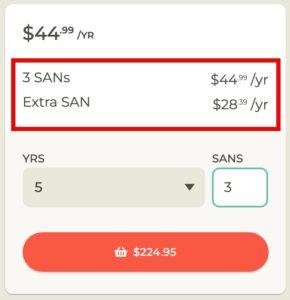
A Multi-Domain Certificate, often referred to as a SAN (Subject Alternative Name) or UCC (Unified Communications Certificate), allows you to secure multiple, distinct domain names under a single SSL certificate. These are usually sold with a base number of SANs and then additional SANs are on a per SAN base. Normally, they are cheaper than buying separate Single-Domain certificates.
Key Rules to Remember with wildcard
Levels Matter – A wildcard for *.infosecmonkey.com secures blog.infosecmonkey.com, but it usually will not secure a second-level subdomain like test.dev.infosecmonkey.com.
Cost vs. Management – While Wildcards are more expensive than single-domain certs, they simplify management because you only have one expiration date to track for all your subdomains.
Trusted Certificate Authorities (CAs) 2026
DigiCert – https://www.digicert.com
Sectigo (formerly Comodo CA) – https://sectigo.com
GlobalSign – https://www.globalsign.com
Let’s Encrypt – https://letsencrypt.org
Entrust – https://www.entrust.com
GoDaddy – https://www.godaddy.com/web-security/ssl-certificate
SSL.com – https://www.ssl.com
Network Solutions – https://www.networksolutions.com/security/ssl-certificates
Google Trust Services – https://pki.goog
Amazon Trust Services – https://www.amazontrust.com
*Amazon Trust Services used to be only for AWS devices and required a load-balancers, as of June 2025, this changed and now they do not requie a load-balancer and can be exported.
Process for Obtaining a Trusted Certificate
1. Create a Certificate Signing Request (CSR)
You package your Public Key along with identifying information about your organization (domain name, company name, location) into a file called a CSR. For a wildcard certificate, the portal you are purchasing from can generate a CSR for you.
Note: Think of the CSR as your “application form.” It contains everything the authority needs to know to build your certificate.
2. Submit the CSR to a Certificate Authority (CA)
You send your CSR to a Certificate Authority (like DigiCert, Let’s Encrypt, or Sectigo). These are the “notaries” of the internet that browsers already trust.
3. Domain and Identity Validation
The CA doesn’t just take your word for it. They must verify you actually own the domain or represent the organization. This happens in levels as described above in the validation level section.
4. Issuance and Signing
Once the CA is satisfied, they take your public key and info, wrap it in a digital “envelope,” and sign it with their own private key. This signature is what makes the certificate “trusted”
Because browsers (Chrome, Safari, etc.) already have the CA’s public key saved, they can verify the CA’s signature instantly.
5. Installation
The CA sends you the signed certificate (often a .crt or .pem file). You install this on your web server alongside your original Private Key.
Certificate File Formats
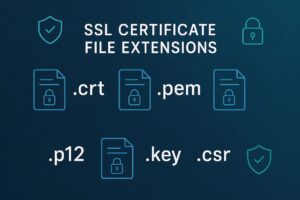
Navigating certificate formats can feel like wandering through a soup of acronyms. The “format” usually refers to how the data (the keys and certificates) is encoded and whether multiple items are bundled into a single file. Most formats fall into two categories: Base64 ASCII (text-based, readable in Notepad) and Binary (not human-readable).
PEM (Privacy Enhanced Mail)
This is the most common format you’ll encounter, especially on Linux/Apache/Nginx servers.
Extension: .pem, .crt, .cer, .key
Encoding: Base64 ASCII. It starts with —–BEGIN CERTIFICATE—–
Contents: Can store public certificates, private keys, and intermediate CA chains.
When to use it: Almost any time you are working with web servers like Nginx or Apache.
PKCS#12 (Public Key Cryptography Standards #12)
Also known as PFX. This is a “suitcase” format that stores the server certificate, any intermediate certificates, and the private key all in one encrypted file.
Extension: .pfx, .p12
Encoding: Binary.
When to use it: Mandatory for Windows/IIS servers and often used to import certificates into Java KeyStores or personal browsers for client authentication. Because it contains the private key, it is almost always password-protected.
DER (Distinguished Encoding Rules)
This is the “raw” version of a certificate. If you take a PEM file and strip away the “BEGIN/END” headers and convert the Base64 back to binary, you get DER.
Extension: .der, .cer
Encoding: Binary.
When to use it: Mostly used in Java platforms or specialized legacy hardware. It typically only holds one certificate and no private key.
PKCS#7 / P7B
Unlike PKCS#12, this format cannot contain a private key. It is strictly used to bundle the public certificate and the “Chain of Trust” (intermediate certificates).
Extension: .p7b, .p7c
Encoding: Base64 ASCII. It starts with —–BEGIN PKCS7—–.
When to use it: Used often in Windows and Java Tomcat to export a bundle of certificates to prove the path back to a Root CA.
If you need to convert a certificate to a different format, you can do that with OpenSSL. I wrote an article on that a while ago.
Hope this helps
Recent posts
-

-

DNS is one of those technologies that quietly underpins... Full Story
-

BGP issues on FortiGate firewalls usually trace back to... Full Story
-

Every time your laptop talks to your router, a... Full Story
-

If you've spent any time configuring NAT on a... Full Story
-

If you have spent any time configuring firewall policies... Full Story
-

High availability on FortiGate is one of those features... Full Story
-

If you've configured SD-WAN on a FortiGate, you've almost... Full Story
-

FortiLink is the management protocol that turns a FortiSwitch... Full Story
-

FortiSwitches are pretty rock solid from Mean Time Between... Full Story
-

This is a quicky tip. Have you ever gone... Full Story
-

DNS is one of those quiet pieces of internet... Full Story
-

This article is an updated version of the previous... Full Story
-

You will add ns2 as a secondary (slave) BIND9... Full Story
-

In the process of deploying my lab, I needed... Full Story
-

RFC 8805, used to be known as Self-Correcting IP... Full Story
-

Years back, I wrote an article about certificate pinning. ... Full Story
-

FortiGates have the ability to send alerts to Microsoft... Full Story
-

In this post, I am going to walk through... Full Story
-

Troubleshooting VoIP on a FortiGate can feel like trying... Full Story
-

Prior to FortiOS 7.0, there were three commands to... Full Story
-

In this post, I am going to go over... Full Story
-

What we are going to do: We are going... Full Story
-

Choosing between FGCP (FortiGate Clustering Protocol) and FGSP (FortiGate... Full Story
-

Creating a VLAN on macOS (The "Pro" Move) A... Full Story
-

This blog post explores the logic behind how macOS... Full Story
-

Pretty Fly for a Wi-Fi Tell My Wi-Fi Love... Full Story
-

Part of my daily gig is creating BoMs (Bill-of-Materials)... Full Story
-

ICMP introduces several security risks, but careful filtering, rate... Full Story
-

The command diag debug application dhcps -1 enables full... Full Story
-

In the world of FortiOS, execute tac report is... Full Story
-

LLDP; What is it The Link Layer Discovery Protocol... Full Story
-

What it actually does When you run diagnose fdsm... Full Story
-

Monkey Bites are bite-sized, high-impact security insights designed for... Full Story
-

I have run macOS in macOS with Parallels but... Full Story
-

Don't be confused with my other FortiNAC posts where... Full Story
-

This is the third session in a multi-part article... Full Story
-

Today I was configuring key-based authentication on a FortiGate... Full Story
-

Netcat, often called the "Swiss Army knife" of networking,... Full Story
-

At its core, IEEE 802.1X is a network layer... Full Story
-

In case you did not see the previous FortiNAC... Full Story
-

This is our 5th session where we are going... Full Story
-

Now that we have Wireshark installed and somewhat configured,... Full Story
-

The Philosophy of Packet Analysis Troubleshooting isn't about looking... Full Story
-

The short version Single-click the Format Painter and it... Full Story
-

Quick-Tip The default macOS zsh prompt prints your username,... Full Story
-

Executive summary. After Apple significantly upgraded Reminders, I finally... Full Story