
If you've spent any time configuring user authentication on... Full Story
By Manny Fernandez
July 3, 2026
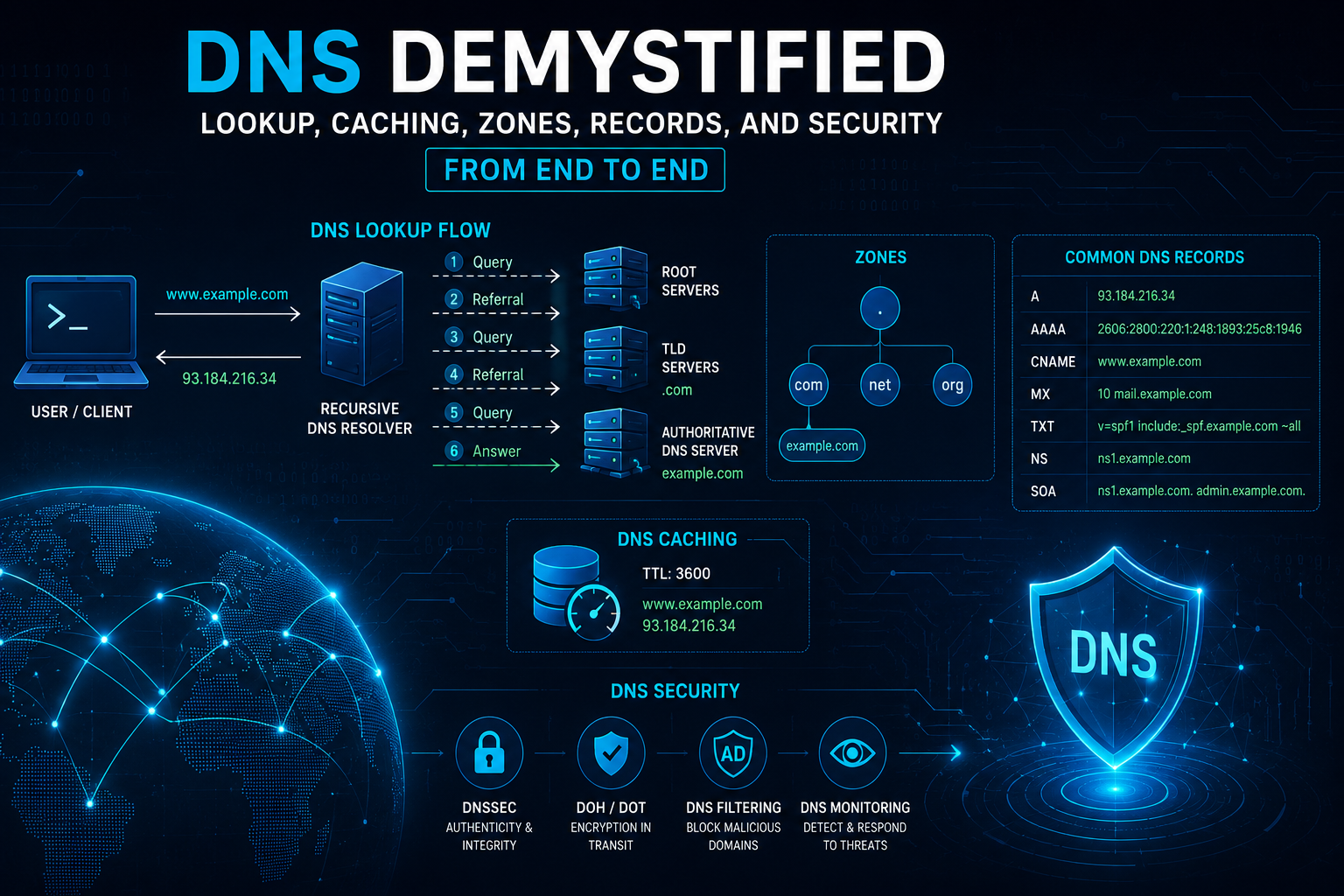
DNS Demystified: Lookup, Caching, Zones, Records, and Security from End to End
1. Executive Summary
Objective: This guide explains exactly how DNS resolves a name into an answer, what happens at every cache along the path, how TTL governs that caching, how zones and record types are structured, and which security controls (DNSSEC, DoH/DoT, DNS filtering, response policy zones) protect the whole system. The goal is a single reference that takes you from the moment a user types a name to the moment a cached answer expires, with nothing hand-waved in between.
Target Audience: Network engineers, security engineers, system administrators, and SOC analysts who need an operational, not academic, understanding of DNS. Working knowledge of TCP/IP and the CLI is assumed.
2. Prerequisites and Architecture
Assumed Knowledge
You should already understand IP addressing, the difference between TCP and UDP, basic routing, and how to read a packet capture. You do not need prior DNS internals knowledge; that is what this guide builds.
Environment / Lab Requirements
To follow the verification steps, you need a Linux or Windows host with dig (BIND utilities) or nslookup, plus optional tcpdump/Wireshark for packet inspection. A recursive resolver you control (Unbound, BIND, or a Windows DNS server) is useful for the caching and DNSSEC sections but not mandatory. Everything below also works against public resolvers (1.1.1.1, 8.8.8.8, 9.9.9.9).
DNS Component Roles
| Component | Role | Example |
| Stub resolver | Client-side library that asks one configured resolver and trusts the answer | OS resolver on a laptop |
| Recursive resolver (caching) | Does the legwork: queries the hierarchy on the client’s behalf and caches results | 1.1.1.1, internal Unbound at 10.0.0.53 |
| Root server | Top of the hierarchy; answers with referrals to TLD servers | a.root-servers.net (198.41.0.4) |
| TLD server | Authoritative for a top-level domain; refers to the zone’s authoritative server | TLD servers for .com |
| Authoritative server | Holds the actual zone data and gives the final answer | ns1.example.com |
| Forwarder | A resolver that hands queries to another resolver instead of recursing itself | Branch FortiGate forwarding to 10.0.0.53 |
3. Step-by-Step Implementation Workflow
This section walks the lifecycle of a single query, www.example.com, from cold cache to expiry.
Phase 1: The Stub Resolver and the First Hop
The Goal: Understand what the client actually does. It does almost nothing.
The Action: When an application calls getaddrinfo() for www.example.com, the OS stub resolver checks its own small cache and the hosts file, then sends a single recursive query (the RD “Recursion Desired” bit set) to the resolver listed in its network config. The stub does not walk the hierarchy. It asks once and waits.
The Config: Confirm which resolver the client uses.
# Linux (systemd-resolved)
resolvectl status
# Linux (classic)
cat /etc/resolv.conf
# Windows
Get-DnsClientServerAddress
ipconfig /all
#macOS
scutil --dns
GUI Verification: On Windows, Control Panel > Network and Sharing Center > Adapter Settings > IPv4 Properties shows the configured DNS servers. On macOS, System Settings > Network > Details > DNS.
Phase 2: Recursive Resolution Through the Hierarchy
The Goal: Resolve the name when the recursive resolver has nothing cached (a cold cache).
The Action: The recursive resolver walks the tree top-down. Each step returns either a referral (a delegation to servers lower in the tree) or the final answer.
1. Resolver asks a root server for www.example.com. Root replies with a referral: the NS records for .com and their glue (IP addresses).
2. Resolver asks a .com TLD server. It replies with a referral: the NS records for example.com.
3. Resolver asks the authoritative server for example.com. It replies with the actual A/AAAA record, the authoritative answer (the AA “Authoritative Answer” bit set).
4. Resolver caches every record it learned along the way (the NS referrals and the final answer), each with its own TTL, then returns the answer to the stub.
The Config: Watch the full walk yourself with +trace, which disables the resolver cache and queries each tier directly.
dig +trace www.example.com
You will see root, then TLD, then authoritative responses in sequence, mirroring the four steps above.
GUI Verification: Not applicable; this is a protocol-level operation. Use a packet capture (tcpdump -ni any port 53) to see each query and referral on the wire.
Phase 3: Caching and TTL
The Goal: Understand why the second lookup is instant and how long “instant” lasts.
The Action: Every record carries a TTL (Time To Live), in seconds, set by the zone’s authoritative server. The recursive resolver caches the record and counts the TTL down. While the record is cached, any client asking for the same name gets an immediate cached answer with no upstream traffic. The resolver returns the remaining TTL, not the original, so repeated queries show a decreasing number. When the TTL hits zero, the record is evicted and the next query triggers a fresh resolution.
Caching happens at multiple layers: the authoritative server sets the TTL, the recursive resolver caches per that TTL, and the stub resolver and even the browser keep their own short-lived caches.
The Config: Query the same name twice and watch the TTL drop.
# First query: full TTL from authoritative (e.g., 3600)
dig www.example.com A +noall +answer
# Wait a few seconds, query again against the SAME recursive resolver:
dig www.example.com A +noall +answer
# The TTL is now lower (e.g., 3593), proving you hit the cache.
Set TTL intentionally in a zone file (authoritative side):
; $TTL is the default TTL for records that don't specify their own
$TTL 3600
www IN A 203.0.113.10 ; inherits 3600
api 300 IN A 203.0.113.20 ; explicit 300s TTL for fast failover
Operational note: Lower TTL before a planned migration (e.g., drop to 300 a day ahead) so the cutover propagates fast. Raise it back afterward to cut query volume. There is no “flush the internet” command; you can only flush caches you control.
The Config (flushing local caches):
# Linux systemd-resolved
sudo resolvectl flush-caches
# Windows
ipconfig /flushdns
# macOS
sudo dscacheutil -flushcache; sudo killall -HUP mDNSResponder
Phase 4: Zones, Delegation, and Authority
The Goal: Understand the unit DNS is actually administered in: the zone.
The Action: A zone is a contiguous portion of the namespace under one administrative control, stored in a zone file (or zone database). The boundary between a parent zone and a child zone is a delegation: the parent holds NS records pointing at the child’s authoritative servers, and authority transfers there. example.com and a delegated eng.example.com are two separate zones even though one is a subdomain of the other.
Two server roles within a zone:
– Primary (master): holds the editable, authoritative copy of the zone.
– Secondary (slave): pulls a read-only copy via a zone transfer (AXFR for full, IXFR for incremental), triggered by the SOA serial number changing and signaled by a NOTIFY.
The Config (a minimal zone file):
$TTL 3600
@ IN SOA ns1.example.com. hostmaster.example.com. (
2024060101 ; serial: bump on every change
7200 ; refresh: how often secondary checks
3600 ; retry: wait after a failed refresh
1209600 ; expire: secondary stops answering after this
300 ) ; minimum / negative-cache TTL
@ IN NS ns1.example.com.
@ IN NS ns2.example.com.
ns1 IN A 203.0.113.53
ns2 IN A 198.51.100.53
www IN A 203.0.113.10
GUI Verification: On Windows DNS Manager, expand Forward Lookup Zones; each zone appears as a node, and right-click > Properties > Start of Authority shows the SOA fields above.
Phase 5: Record Types You Will Actually Touch
The Goal: Know what each common record does and when to reach for it.
| Record | Purpose | Example value |
| A | Maps a name to an IPv4 address | 203.0.113.10 |
| AAAA | Maps a name to an IPv6 address | 2001:db8::10 |
| CNAME | Alias: points one name at another (never coexists with other records at the same name) | www -> webhost.cdn.net. |
| MX | Mail exchanger, with a priority value (lower wins) | 10 mail.example.com. |
| NS | Delegates a zone to authoritative name servers | ns1.example.com. |
| SOA | Start of Authority: zone-wide parameters (serial, timers, primary, contact) | see Phase 4 |
| TXT | Arbitrary text; SPF, domain verification, policy data | v=spf1 include:_spf… -all |
| PTR | Reverse lookup: IP back to name (in-addr.arpa / ip6.arpa) | …in-addr.arpa -> www.example.com. |
| SRV | Locates a service (host + port) for a protocol | _sip._tcp 10 5 5060 sip.example.com. |
| CAA | Declares which CAs may issue certs for the domain | 0 issue “letsencrypt.org” |
| DNSKEY / RRSIG / DS / NSEC(3) | DNSSEC chain-of-trust records (see Phase 7) | signatures and key material |
The Action / Config: Query any type explicitly.
dig example.com MX +short
dig example.com TXT +short
dig _sip._tcp.example.com SRV +short
dig 203.0.113.10 -x +short # reverse / PTR lookup
CNAME gotcha worth stating up front: a name with a CNAME cannot also carry A, MX, or any other record. This is why you cannot CNAME a zone apex (the apex must hold SOA and NS). Use ALIAS/ANAME (provider-specific) or an A record at the apex instead.
Phase 6: Negative Caching and Failure Answers
The Goal: Understand that “no such name” is also cached.
The Action: When a name does not exist, the authoritative server returns NXDOMAIN. Resolvers cache that negative answer too, governed by the minimum field in the SOA (the last value in Phase 4’s SOA). If that is 300, a typo’d hostname stays “broken” in cache for up to five minutes even after you create the record. Plan record creation before you advertise the name.
dig doesnotexist.example.com
# status: NXDOMAIN in the header, with the SOA in the AUTHORITY section
Phase 7: Securing DNS
The Goal: Layer on the controls that address DNS’s three big weaknesses: spoofing/tampering, eavesdropping, and abuse.
7a. DNSSEC (integrity and authenticity).
DNS itself has no built-in proof that an answer is genuine, which enables cache poisoning. DNSSEC signs records cryptographically. Each zone signs its records (RRSIG), publishes its public keys (DNSKEY), and the parent zone publishes a DS record that hashes the child’s key, forming a chain of trust from the root down. A validating resolver checks the signatures and sets the **AD** (Authenticated Data) bit when validation succeeds.
# Request DNSSEC data and validation
dig example.com A +dnssec
# Success indicators: the ad flag in the header flags line,
# and RRSIG records alongside the answer.
dig dnssec-failed.org A +dnssec
# A validating resolver returns SERVFAIL on a broken chain, not a forged answer.
DNSSEC protects integrity, not confidentiality. It does not hide your queries.
7b. DoH and DoT (confidentiality).
Classic DNS is plaintext UDP/53; anyone on-path can read or modify it. DoT (DNS over TLS, port 853) and DoH (DNS over HTTPS, port 443) encrypt the stub-to-resolver hop.
# DoT query with kdig (knot-dnsutils)
kdig -d @1.1.1.1 +tls-ca +tls-host=cloudflare-dns.com example.com
# DoH query with curl against a DoH endpoint
curl -s -H 'accept: application/dns-json' \
'https://cloudflare-dns.com/dns-query?name=example.com&type=A'
These encrypt the first hop only; the resolver still queries authoritative servers in the clear unless those support encryption.
7c. DNS filtering / RPZ (abuse control).
A Response Policy Zone lets a resolver override answers: return NXDOMAIN for known-malicious domains, redirect to a sinkhole, or block newly registered domains. This is the mechanism behind protective DNS (Quad9, Cisco Umbrella, FortiGuard DNS filtering on a FortiGate).
; RPZ zone snippet (BIND): block and sinkhole
$TTL 60
@ IN SOA localhost. root.localhost. (1 1h 15m 30d 1h)
IN NS localhost.
badware.com CNAME . ; NXDOMAIN this name
*.badware.com CNAME . ; and everything under it
phishing.example CNAME sinkhole.security.lan.
# named.conf: attach the policy
response-policy { zone "rpz.security.lan"; };
7d. Other hardening worth doing:
Restrict zone transfers (allow-transfer to known secondaries only, or you leak your whole zone via AXFR), enable source-port and query-ID randomization (default in modern resolvers, defeats Kaminsky-style poisoning), and rate-limit responses (RRL) on authoritative servers to blunt amplification/reflection DDoS.
# Confirm whether a server foolishly allows AXFR to the world:
dig @ns1.example.com example.com AXFR
# A locked-down server answers: “Transfer failed.”
4. Verification and Validation
Run these to confirm each layer behaves:
# 1. Resolution works end to end and shows the answer + TTL
dig www.example.com A +noall +answer
# 2. Caching is active: TTL decreases on a repeat query to the same resolver
dig www.example.com A +noall +answer # note the TTL, run twice
# 3. The full delegation path is healthy
dig +trace www.example.com
# 4. Which resolver actually answered, and was it authoritative?
dig www.example.com +noall +stats # check SERVER line
dig www.example.com # look for 'aa' flag if authoritative
# 5. DNSSEC validates
dig example.com +dnssec # look for the 'ad' flag
# 6. Negative caching behaves
dig nope.example.com # expect NXDOMAIN
What success looks like:
– status: NOERROR in the header for a valid name, with an ANSWER section.
– A TTL that counts down across repeated queries (cache hit).
– +trace reaching the authoritative server and returning the A record.
– The ad flag present when querying a DNSSEC-signed zone through a validating resolver.
– status: NXDOMAIN for a name that genuinely does not exist, with the SOA in the AUTHORITY section.
5. Troubleshooting and Gotchas
Gotcha 1: “I changed the record but the world still sees the old one.”
This is TTL, not a bug. Resolvers downstream cache the old value until its TTL expires. You can only flush caches you control.
– Diagnose: dig @8.8.8.8 www.example.com +noall +answer and read the remaining TTL; that is how long that resolver will keep serving the old answer.
– Resolve: wait out the TTL, flush your own resolvers, and next time lower the TTL well before the change.
Gotcha 2: SERVFAIL on a name that clearly exists.
SERVFAIL is the resolver saying “I could not get a valid answer,” and a very common cause is a broken DNSSEC chain (expired RRSIG, missing or mismatched DS at the parent).
– Diagnose: dig example.com +cd (the +cd “Checking Disabled” flag bypasses DNSSEC validation). If it works with +cd but fails without, the problem is DNSSEC, not reachability.
– Resolve: re-sign the zone / refresh expired signatures, and confirm the parent’s DS matches your current DNSKEY (dig example.com DS @parent-ns).
Gotcha 3: Intermittent or partial resolution, especially for new or large records.
Often a transport issue. Large responses (DNSSEC, many records) exceed the old 512-byte UDP limit and need EDNS0 or TCP fallback; a firewall that blocks TCP/53 or strips EDNS will cause sporadic failures.
– Diagnose: dig example.com +tcp to force TCP, and dig example.com +bufsize=4096 to test EDNS. If TCP works but UDP truncates and fails, your path is dropping large UDP or TCP/53.
– Resolve: allow TCP/53 through firewalls (it is not optional), and ensure EDNS0 is permitted end to end. On a FortiGate, confirm the DNS filter profile and any DNS proxy are not truncating EDNS.
Bonus gotcha: the apex CNAME trap.
You cannot put a CNAME on the zone apex (example.com itself) because the apex must carry SOA and NS records, and a CNAME cannot coexist with other records. Symptom: the provider rejects the record or mail/other services break. Resolve with an A record at the apex or a provider ALIAS/ANAME pseudo-record.
Recent posts
-

-

DNS is one of those technologies that quietly underpins... Full Story
-

BGP issues on FortiGate firewalls usually trace back to... Full Story
-

Every time your laptop talks to your router, a... Full Story
-

If you've spent any time configuring NAT on a... Full Story
-

If you have spent any time configuring firewall policies... Full Story
-

High availability on FortiGate is one of those features... Full Story
-

If you've configured SD-WAN on a FortiGate, you've almost... Full Story
-

FortiLink is the management protocol that turns a FortiSwitch... Full Story
-

FortiSwitches are pretty rock solid from Mean Time Between... Full Story
-

This is a quicky tip. Have you ever gone... Full Story
-

DNS is one of those quiet pieces of internet... Full Story
-

This article is an updated version of the previous... Full Story
-

You will add ns2 as a secondary (slave) BIND9... Full Story
-

In the process of deploying my lab, I needed... Full Story
-

RFC 8805, used to be known as Self-Correcting IP... Full Story
-

Years back, I wrote an article about certificate pinning. ... Full Story
-

FortiGates have the ability to send alerts to Microsoft... Full Story
-

In this post, I am going to walk through... Full Story
-

Troubleshooting VoIP on a FortiGate can feel like trying... Full Story
-

Prior to FortiOS 7.0, there were three commands to... Full Story
-

In this post, I am going to go over... Full Story
-

What we are going to do: We are going... Full Story
-

Choosing between FGCP (FortiGate Clustering Protocol) and FGSP (FortiGate... Full Story
-

Creating a VLAN on macOS (The "Pro" Move) A... Full Story
-

This blog post explores the logic behind how macOS... Full Story
-

Pretty Fly for a Wi-Fi Tell My Wi-Fi Love... Full Story
-

Part of my daily gig is creating BoMs (Bill-of-Materials)... Full Story
-

ICMP introduces several security risks, but careful filtering, rate... Full Story
-

The command diag debug application dhcps -1 enables full... Full Story
-

In the world of FortiOS, execute tac report is... Full Story
-

LLDP; What is it The Link Layer Discovery Protocol... Full Story
-

What it actually does When you run diagnose fdsm... Full Story
-

Monkey Bites are bite-sized, high-impact security insights designed for... Full Story
-

I have run macOS in macOS with Parallels but... Full Story
-

Don't be confused with my other FortiNAC posts where... Full Story
-

This is the third session in a multi-part article... Full Story
-

Today I was configuring key-based authentication on a FortiGate... Full Story
-

Netcat, often called the "Swiss Army knife" of networking,... Full Story
-

At its core, IEEE 802.1X is a network layer... Full Story
-

In case you did not see the previous FortiNAC... Full Story
-

This is our 5th session where we are going... Full Story
-

Now that we have Wireshark installed and somewhat configured,... Full Story
-

The Philosophy of Packet Analysis Troubleshooting isn't about looking... Full Story
-

Executive Summary Objective: Get you from zero to writing... Full Story
-

NAND cells, the flash translation layer, SLC caching, TRIM,... Full Story
-

Nmap Scripting Engine (NSE): From One-Liners to Your First... Full Story