
If you've spent any time configuring user authentication on... Full Story
By Manny Fernandez
October 15, 2026
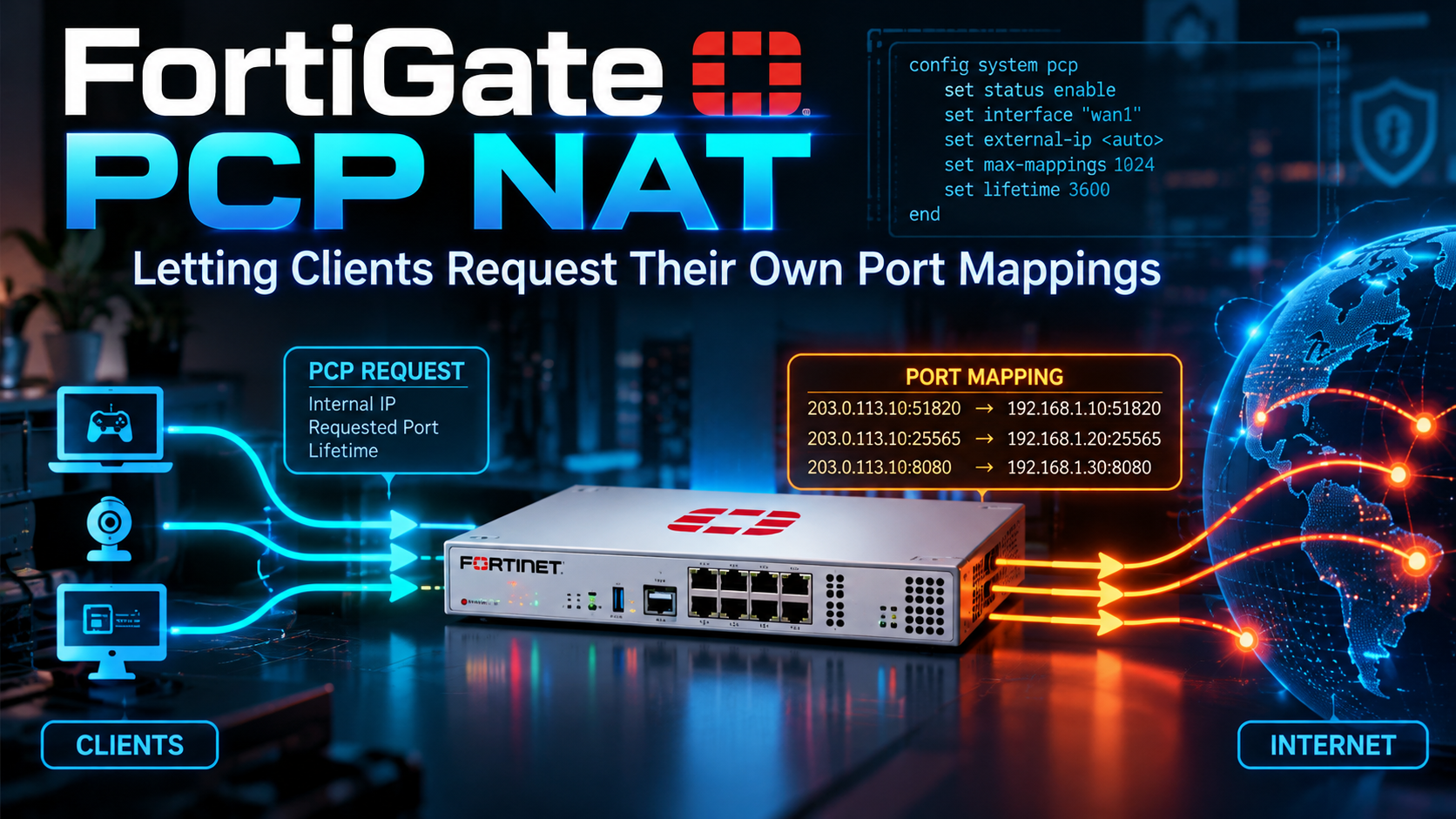
FortiGate PCP NAT: Letting Clients Request Their Own Port Mappings
Port Control Protocol server, pools, pcp-outbound SNAT and pcp-inbound DNAT on FortiOS
Executive Summary
Static VIPs are fine when you know in advance which internal host needs which public port. They fall apart when the host behind the firewall is a game console, a softphone, a P2P app or a subscriber behind carrier-grade NAT, and the port it needs changes every time the app restarts. The Port Control Protocol (PCP, RFC 6887) fixes that by letting the client ask the NAT device for a mapping, get back the public IP and port it was given, and renew or release it on a timer.
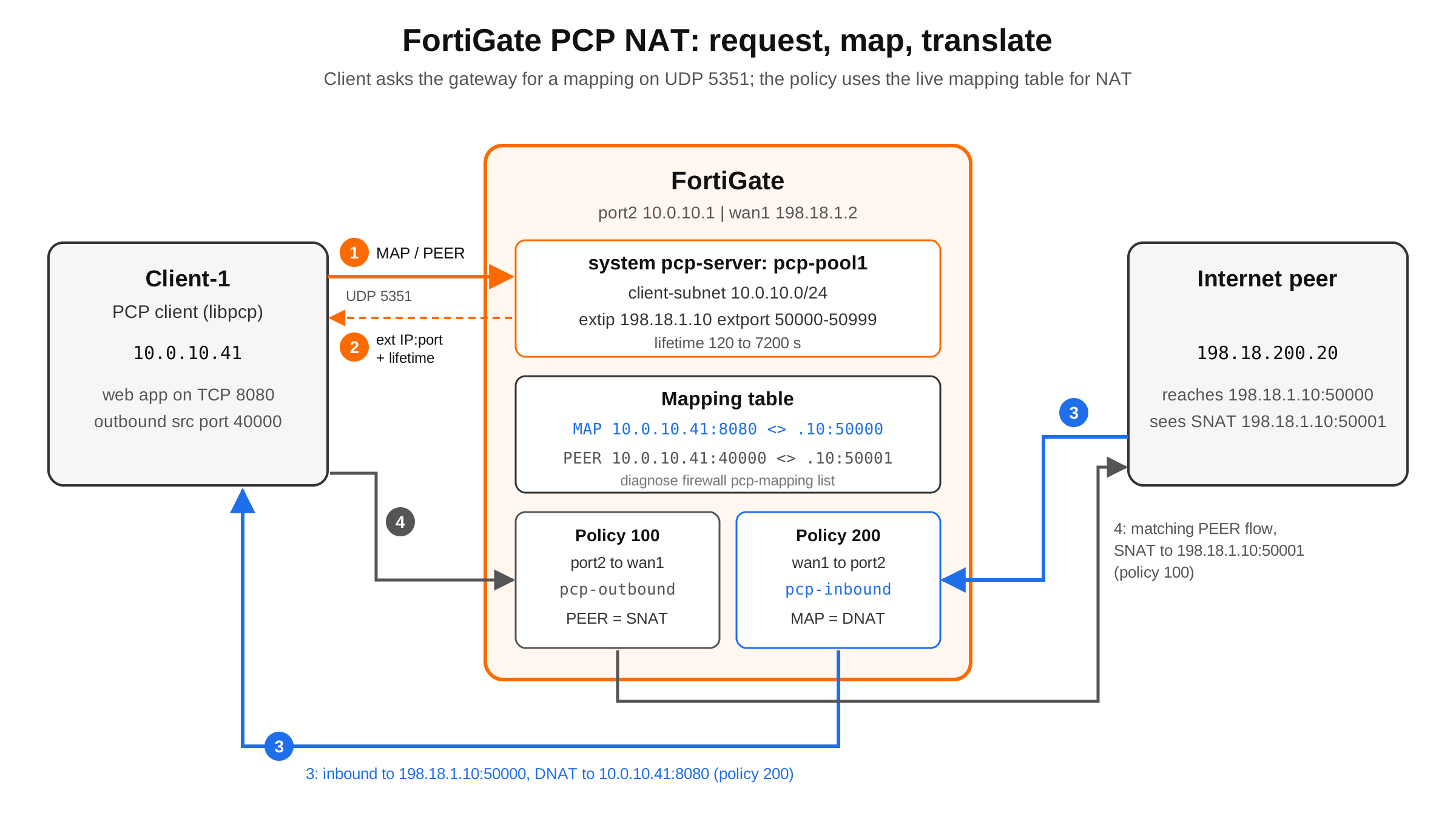
FortiOS can act as the PCP server. You define a pool under config system pcp-server, then reference that pool from a firewall policy in one of two modes: pcp-outbound (the PCP PEER opcode drives source NAT) or pcp-inbound (the PCP MAP opcode drives destination NAT). The FortiGate builds and expires the mappings on its own; you never touch a VIP.
| Item | Detail |
|---|---|
| Objective | Deploy FortiGate as a PCP server and verify both SNAT (PEER) and DNAT (MAP) mappings |
| Target audience | FortiGate admins, ISP and CGNAT engineers, anyone tired of one-off VIPs |
| FortiOS | 7.4.0 and later (feature introduced in 7.4.0); 8.0 adds IPv6 clients and NAT46 |
| Interface | CLI only for the PCP server and the policy PCP fields |
| Protocol | PCP over UDP 5351, RFC 6887 |
PCP in Two Minutes
PCP is the standards-track successor to Apple’s NAT-PMP. A client sends a small UDP request to its default gateway on port 5351, the server answers with the external address, external port and the lifetime it granted. The client has to renew before the lifetime runs out or the mapping is removed. Three opcodes matter:
| Opcode | What the client asks for | FortiGate policy mode | NAT direction |
|---|---|---|---|
| MAP | Open an inbound port to my internal IP:port from anyone (or a filtered set of peers) | pcp-inbound | DNAT |
| PEER | Pin the public IP:port my outbound flow to a specific remote peer will use | pcp-outbound | SNAT |
| ANNOUNCE | Server tells clients it restarted so they refresh their mappings | n/a (server side) | n/a |
Why care on a FortiGate? The classic cases are CGNAT deployments where subscribers need inbound reachability without a ticket to the NOC, VoIP and gaming clients that break behind symmetric NAT, and IoT gateways that need a predictable public port for a callback. PCP gives the app what it needs while the firewall still owns the address space, the port range, the lifetime and the policy that inspects the traffic.
Prerequisites and Lab Architecture
Assumed knowledge
- FortiGate firewall policy and policy-based NAT basics (IP pools, VIPs)
- Comfort in the FortiOS CLI and with
diagnose sys sessionand the packet sniffer - A Linux host you can install a PCP client on for testing
Lab components
| Component | Interface / Address | Role |
|---|---|---|
| Client-1 (Ubuntu) | 10.0.10.41/24 | PCP client, runs a test web server on TCP 8080 |
| FortiGate LAN | port2, 10.0.10.1/24 | Default gateway and PCP server listener (intl-intf) |
| FortiGate WAN | wan1, 198.18.1.2/24 | Egress interface (ext-intf) |
| PCP pool external IP | 198.18.1.10 | Public address handed out in mappings (extip) |
| PCP pool external ports | 50000-50999 | Port range handed out in mappings (extport) |
| Internet peer | 198.18.200.20 | Remote host used to test both directions |
Note: Addressing follows the InfoSecMonkey lab convention: 198.18.0.0/15 stands in for public space, 10.0.0.0/16 for internal LANs. Swap in your own values.
Step-by-Step Implementation
Step 1: Build the PCP server pool
Goal: tell the FortiGate which clients may ask for mappings and what it is allowed to hand out.
Action: enable the PCP server and create one pool. Keep client-subnet as tight as the use case allows; it is the first line of control over who can punch holes in your firewall.
config system pcp-server
    set status enable
    config pools
        edit "pcp-pool1"
            set client-subnet "10.0.10.0/24"
            set ext-intf "wan1"
            set extip 198.18.1.10
            set extport 50000-50999
            set intl-intf "port2"
            set minimal-lifetime 120
            set maximal-lifetime 7200
            set client-mapping-limit 32
            set mapping-filter-limit 1
            set allow-opcode map peer announce
            set third-party disallow
            set recycle-delay 60
        next
    end
end
GUI verification: none. The PCP server has no GUI page; confirm with show system pcp-server.
Step 2: Pool option reference
Every field under config pools, with the ranges and defaults Fortinet documents. Run set ? on your build to confirm, since defaults have shifted slightly across releases.
| Option | What it does | Range / default | Practitioner note |
|---|---|---|---|
| client-subnet | Subnets allowed to send PCP requests | Required | Requests from anywhere else are ignored |
| client6-prefix | IPv6 prefixes allowed to send requests | 8.0+ | Used with nat46 for CLAT-based CPEs |
| ext-intf | External interface the mappings live on | Required | Usually your WAN or SD-WAN member |
| extip | Public IP or range handed out | IP or IP-IP | Must be routable to the FortiGate |
| extport | Public port or range handed out | Port or port-port | Size it for clients x mappings |
| intl-intf | Internal interface(s) the server listens on | Interface list | Where UDP 5351 requests arrive |
| minimal-lifetime | Shortest lifetime granted, seconds | 60-300, default 120 | Requests below this are raised |
| maximal-lifetime | Longest lifetime granted, seconds | 3600-604800, default 86400 | Lower it for CGNAT churn |
| client-mapping-limit | Mappings one client may hold | 0 = unlimited | Set it; stops one host draining the pool |
| mapping-filter-limit | Peer filters allowed per MAP mapping | 0-5, default 1 | Filters restrict who can hit a MAP |
| allow-opcode | Opcodes the pool accepts | map peer announce | Drop map if you only want SNAT pinning |
| third-party | Allow a client to request for another IP | allow / disallow | Keep disallow unless you need it |
| third-party-subnet | Subnets a third-party request may name | Subnet list | Only relevant with third-party allow |
| multicast-announcement | Send ANNOUNCE on server restart | enable / disable | Lets clients rebuild after reboot |
| announcement-count | Times the ANNOUNCE is repeated | Integer | Default is fine for most LANs |
| recycle-delay | Wait before an expired port is reused, seconds | 0-3600 | Non-zero avoids stale-flow collisions |
| nat46 | Map IPv6 clients to IPv4 external space | 8.0+ | Pairs with client6-prefix |
Step 3: SNAT with pcp-outbound (PEER opcode)
Goal: let a client pin the public IP:port its outbound flow to a specific peer will use.
Action: on the LAN to WAN policy, turn on NAT and point the policy at the PCP pool instead of an IP pool.
config firewall policy
    edit 100
        set name "LAN-to-WAN-pcp-outbound"
        set srcintf "port2"
        set dstintf "wan1"
        set action accept
        set srcaddr "all"
        set dstaddr "all"
        set schedule "always"
        set service "ALL"
        set nat enable
        set pcp-outbound enable
        set pcp-poolname "pcp-pool1"
        set logtraffic all
    next
end
Only flows that match an existing PEER mapping (same internal IP:port, same remote IP:port, same protocol) get the PCP-assigned source. Every other session on that policy falls back to normal interface NAT. That is expected behavior and the first thing people misread in the session table.
GUI verification: the policy shows NAT enabled; the PCP fields are visible only in the CLI.
Step 4: DNAT with pcp-inbound (MAP opcode)
Goal: let a client open an inbound port to itself without an admin building a VIP.
Action: create a WAN to LAN policy with pcp-inbound and the same pool. The destination is resolved from the live mapping table, so dstaddr all is normal here; the pool and the mapping do the narrowing.
config firewall policy
    edit 200
        set name "WAN-to-LAN-pcp-inbound"
        set srcintf "wan1"
        set dstintf "port2"
        set action accept
        set srcaddr "all"
        set dstaddr "all"
        set schedule "always"
        set service "ALL"
        set pcp-inbound enable
        set pcp-poolname "pcp-pool1"
        set utm-status enable
        set ips-sensor "default"
        set ssl-ssh-profile "certificate-inspection"
        set logtraffic all
    next
end
Note: A MAP mapping is an inbound hole opened by an endpoint, not by you. Treat the pcp-inbound policy like any internet-facing VIP policy: security profiles on, logging on, and source restrictions if the application allows them.
Step 5: Generate requests from the client
Goal: produce real MAP and PEER requests so the FortiGate has something to map.
Action: on Client-1, build the open source libpcp test client (github.com/libpcp/pcp) and point it at the default gateway. Flag names vary slightly between builds, so check pcp --help first.
sudo apt install -y git build-essential autoconf automake libtool
git clone https://github.com/libpcp/pcp.git && cd pcp
./autogen.sh && ./configure && make && sudo make install && sudo ldconfig

# MAP: open inbound TCP to 10.0.10.41:8080 for 3600 s
pcp -s 10.0.10.1 -i 10.0.10.41:8080 -l 3600

# PEER: pin the outbound flow 10.0.10.41:40000 -> 198.18.200.20:80
pcp -s 10.0.10.1 -i 10.0.10.41:40000 -p 198.18.200.20:80 -l 3600
Expected: the client prints the assigned external address, something like 198.18.1.10:50000, and the lifetime the server granted (clamped between minimal-lifetime and maximal-lifetime).
Verification and Validation
Confirm the request reached the server
diagnose sniffer packet any 'udp port 5351' 4 20Success: a request from 10.0.10.41 to 10.0.10.1:5351 on port2 and a response back. Request with no response means the pool rejected it; see Troubleshooting.
List the mappings
diagnose firewall pcp-mapping list inbound     # MAP mappings (DNAT)
diagnose firewall pcp-mapping list outbound    # PEER mappings (SNAT)
Success: each entry shows the pool, the client nonce, the protocol number (6 for TCP, 17 for UDP), the internal IP:port, the external IP:port from the pool and the remaining lifetime. A PEER entry also shows the remote peer IP:port it was pinned to.
Filter a busy mapping table
diagnose firewall pcp-mapping filter clear
diagnose firewall pcp-mapping filter client-ip 10.0.10.41
diagnose firewall pcp-mapping filter ext-port 50000
diagnose firewall pcp-mapping filter protocol 6
diagnose firewall pcp-mapping list inbound
Other filter keys: ext-ip, intl-ip, intl-port, pool, remote-ip, remote-port.
Prove the NAT in the session table
diagnose sys session filter clear
diagnose sys session filter src 10.0.10.41
diagnose sys session list
Outbound success: a session to 198.18.200.20:80 from source port 40000 with hook=post dir=org act=snat translating to 198.18.1.10:50001 (the PEER mapping). A session from the same client to any other destination is translated to the wan1 address instead, because it does not match the PEER mapping.
Inbound success: from the internet peer, browse to http://198.18.1.10:50000; the session shows act=dnat to 10.0.10.41:8080 and matches policy 200.
Clear mappings during testing
diagnose firewall pcp-mapping flush            # everything
diagnose firewall pcp-mapping flush inbound    # MAP only
diagnose firewall pcp-mapping flush outbound   # PEER only
Troubleshooting and Gotchas
1. Requests arrive, no mapping is created
Symptom: the sniffer shows UDP 5351 inbound on port2, the mapping list stays empty.
- Client is outside
client-subnet, or the request lands on an interface not listed inintl-intf. - The opcode is not in
allow-opcode(common after someone trims the list topeer). - The client hit
client-mapping-limit, orextportis exhausted. Count withdiagnose firewall pcp-mapping list inboundand compare against the range size. - The client sent a third-party request (internal IP that is not its own) and
third-partyis disallow.
Fix: correct the pool, then diagnose firewall pcp-mapping flush and re-run the client.
2. Mapping exists, inbound traffic never reaches the client
Symptom: pcp-mapping list inbound shows the entry; the internet peer times out.
diagnose debug reset
diagnose debug flow filter addr 198.18.1.10
diagnose debug flow filter port 50000
diagnose debug flow show iprope enable
diagnose debug flow trace start 20
diagnose debug enable- No policy with
pcp-inbound enableon the wan1 to port2 path, orpcp-poolnamepoints at a different pool. - A VIP or another inbound policy with the same external IP and port sits above policy 200 and wins.
extipis not actually routed to the FortiGate by the upstream (missing ARP or route for 198.18.1.10).- The host firewall on Client-1 blocks TCP 8080, so the FortiGate forwards and the client drops.
3. Outbound traffic is not using the PCP address
Symptom: sessions from the client leave with the wan1 address, not 198.18.1.10.
PEER mappings are five-tuple specific. If the app opened its real flow from a different source port than the one it requested, or to a different peer, the session does not match and falls back to interface NAT. Compare the PEER entry’s internal port and remote IP:port with diagnose sys session list line by line. Also confirm the policy has both nat enable and pcp-outbound enable.
Security gotchas
- PCP MAP is self-service port forwarding. Scope
client-subnetto the hosts or subscriber ranges that need it. - Keep
third-party disallowunless a CPE legitimately requests on behalf of hosts behind it. - Set
client-mapping-limitand a sanemaximal-lifetimeso one compromised host cannot reserve the pool for a week. - Run IPS and logging on the pcp-inbound policy; you did not choose which services are exposed, the endpoints did.
Quick Reference
| Task | Command |
|---|---|
| Show server config | show system pcp-server |
| List MAP (DNAT) mappings | diagnose firewall pcp-mapping list inbound |
| List PEER (SNAT) mappings | diagnose firewall pcp-mapping list outbound |
| Filter mappings | diagnose firewall pcp-mapping filter <key> <value> |
| Flush mappings | diagnose firewall pcp-mapping flush [inbound | outbound] |
| Watch PCP requests | diagnose sniffer packet any ‘udp port 5351’ 4 |
Sources
- Fortinet: Configuring PCP port mapping with SNAT and DNAT (FortiOS 8.0.1)
- Fortinet: Support the Port Control Protocol (FortiOS 7.4.0 New Features)
- Fortinet CLI Reference: diagnose firewall (FortiOS 7.6)
- RFC 6887: Port Control Protocol (PCP)
- libpcp: open source PCP client library and test client
No fluff. Just the config that works.
Recent posts
-

-

DNS is one of those technologies that quietly underpins... Full Story
-

BGP issues on FortiGate firewalls usually trace back to... Full Story
-

Every time your laptop talks to your router, a... Full Story
-

If you've spent any time configuring NAT on a... Full Story
-

If you have spent any time configuring firewall policies... Full Story
-

High availability on FortiGate is one of those features... Full Story
-

If you've configured SD-WAN on a FortiGate, you've almost... Full Story
-

FortiLink is the management protocol that turns a FortiSwitch... Full Story
-

FortiSwitches are pretty rock solid from Mean Time Between... Full Story
-

This is a quicky tip. Have you ever gone... Full Story
-

DNS is one of those quiet pieces of internet... Full Story
-

This article is an updated version of the previous... Full Story
-

You will add ns2 as a secondary (slave) BIND9... Full Story
-

In the process of deploying my lab, I needed... Full Story
-

RFC 8805, used to be known as Self-Correcting IP... Full Story
-

Years back, I wrote an article about certificate pinning. ... Full Story
-

FortiGates have the ability to send alerts to Microsoft... Full Story
-

In this post, I am going to walk through... Full Story
-

Troubleshooting VoIP on a FortiGate can feel like trying... Full Story
-

Prior to FortiOS 7.0, there were three commands to... Full Story
-

In this post, I am going to go over... Full Story
-

What we are going to do: We are going... Full Story
-

Choosing between FGCP (FortiGate Clustering Protocol) and FGSP (FortiGate... Full Story
-

Creating a VLAN on macOS (The "Pro" Move) A... Full Story
-

This blog post explores the logic behind how macOS... Full Story
-

Pretty Fly for a Wi-Fi Tell My Wi-Fi Love... Full Story
-

Part of my daily gig is creating BoMs (Bill-of-Materials)... Full Story
-

ICMP introduces several security risks, but careful filtering, rate... Full Story
-

The command diag debug application dhcps -1 enables full... Full Story
-

In the world of FortiOS, execute tac report is... Full Story
-

LLDP; What is it The Link Layer Discovery Protocol... Full Story
-

What it actually does When you run diagnose fdsm... Full Story
-

Monkey Bites are bite-sized, high-impact security insights designed for... Full Story
-

I have run macOS in macOS with Parallels but... Full Story
-

Don't be confused with my other FortiNAC posts where... Full Story
-

This is the third session in a multi-part article... Full Story
-

Today I was configuring key-based authentication on a FortiGate... Full Story
-

Netcat, often called the "Swiss Army knife" of networking,... Full Story
-

At its core, IEEE 802.1X is a network layer... Full Story
-

In case you did not see the previous FortiNAC... Full Story
-

This is our 5th session where we are going... Full Story
-

Now that we have Wireshark installed and somewhat configured,... Full Story
-

The Philosophy of Packet Analysis Troubleshooting isn't about looking... Full Story
-

APT CVE-2026-109518: How a Download Retry Lets an Attacker... Full Story
-

Managing Windows Firewall from the Command Line: netsh, PowerShell... Full Story
-

Chrome CVE-2026-106378: Patching the macOS Sandbox Escape No fluff.... Full Story